
How to Run Whisper Locally on Mac (Without the Command Line)
Whisper is a Python library, not a desktop app. Here's how to run it locally on your Mac without touching the terminal — including model sizes, RAM, and app options.
OpenAI Whisper is a Python library, not a desktop app. To run the original version you need Python, PyTorch, ffmpeg, and some comfort with the terminal. Most people searching for "run Whisper locally" don't want any of that — they want accurate local transcription without touching the command line.
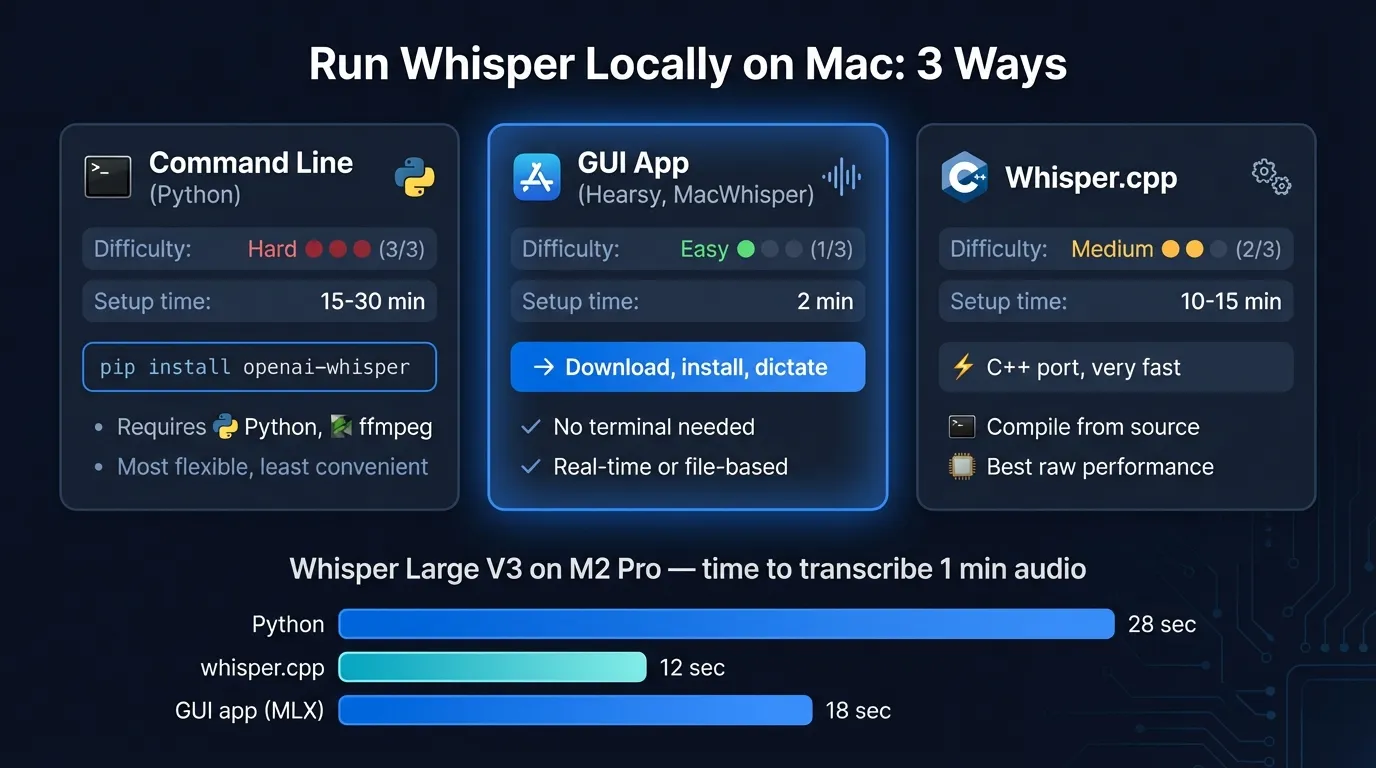
This post covers three paths: the original Python setup, the optimized whisper.cpp port, and desktop apps that wrap everything so you never open a terminal.
Here's a quick look at the three ways to run Whisper on your Mac:
What "running Whisper locally" means#
Whisper processes audio entirely on your machine. Nothing is sent to OpenAI or any server. The model runs on your Mac's CPU, GPU, or Neural Engine depending on the implementation.
This is meaningfully different from cloud transcription tools like AssemblyAI or Otter AI, which send audio to remote servers for processing. Running Whisper locally means no data leaves your Mac, no API key required, and no per-minute billing.
The trade-off is that you need to download the model (up to 2.9 GB for Large) and do the initial setup. After that, it runs indefinitely without network access.
Path 1: The Python package#
The original Whisper requires:
- Python 3.8 or newer (not 3.13 — compatibility issues)
- PyTorch
- ffmpeg installed via Homebrew
pip install openai-whisper
In the terminal it looks like this:
brew install ffmpeg
pip install openai-whisper
whisper audio.mp3 --model large-v3
This works. The Python package is well-maintained and supports all 99 Whisper languages and every model size from Tiny to Large V3.
Where it falls short for everyday use:
- No real-time dictation. You transcribe existing audio files, not live speech.
- Every transcription requires a terminal command with the file path.
- The default PyTorch installation on Mac doesn't use Metal GPU acceleration, so it runs on CPU and is slower than it could be.
- If you need specific models or scripts, you manage that yourself.
For developers who want to batch-transcribe audio files in a pipeline, this is the right path. For anyone who wants to dictate into documents or use Whisper as a daily driver, it isn't.
Path 2: whisper.cpp#
whisper.cpp is a C++ port of Whisper, originally by Georgi Gerganov, now maintained at ggml-org/whisper.cpp. It's what most Mac desktop apps use under the hood.
The advantages over the Python package:
- Metal GPU acceleration out of the box on Apple Silicon
- Core ML support for Apple Neural Engine — the whisper.cpp README documents more than 3x speedup over CPU-only on Mac
- Significantly smaller memory footprint than PyTorch-based inference
- Can be compiled as a library and embedded in other apps
The first time Core ML models run, macOS compiles them to a device-specific format. Subsequent runs are faster.
The catch: building and running whisper.cpp still requires the terminal. You clone the repo, run cmake, build, download model files, and run the binary. It's simpler than the Python setup, but it's not a GUI.
If you're comfortable with a terminal and want to use whisper.cpp in scripts or your own app, the GitHub repository has good documentation. For everyone else, path 3 is faster.
Continue reading
AI Transcription That Stays on Your Mac
Run Whisper and Parakeet locally with a native Mac app. No Python setup, no command line.
Path 3: Desktop apps (no terminal needed)#
Several Mac apps bundle whisper.cpp internally. You download the app, select a model in a settings screen, and it runs locally. No Python, no cmake, no ffmpeg.
| App | Use case | Engine | Model download |
|---|---|---|---|
| Hearsy | Real-time dictation into any app | whisper.cpp + Parakeet | In-app |
| MacWhisper | Transcribe audio/video files | whisper.cpp | In-app |
| SuperWhisper | Real-time dictation | whisper.cpp | In-app |
Hearsy is built for live dictation — hold a hotkey, speak, release, and the transcription appears in whatever app is open. It supports both Whisper Large V3 and Parakeet TDT. The Parakeet engine is faster and more accurate on English; switch to Whisper when you need one of its 99 languages or specialized vocabulary. See the Whisper vs Parakeet comparison for benchmark numbers.
MacWhisper handles file-based transcription well. It doesn't do real-time dictation, but if you record meetings or interviews and want local transcription without writing a script, it's a solid option.
SuperWhisper is another real-time dictation app. It's Whisper-only (no Parakeet), so latency is higher than Hearsy's default engine for English dictation.
All three run the models locally. None send audio to a server.
How to use Whisper in Hearsy#
- Download and install Hearsy from the website
- Complete onboarding to grant Microphone and Accessibility permissions
- Open Settings → Speech Engine
- Select Whisper Large V3 from the engine dropdown
- Click Download — Hearsy fetches the model (about 2.9 GB)
- Once downloaded, hold the dictation hotkey (default: Right Option), speak, release
The model is stored on your Mac and reused for every subsequent dictation. No network connection needed after the initial download.
You can switch back to Parakeet in the same Settings panel at any time. The switch takes a few seconds for model reload, then subsequent sessions start immediately.
Which Whisper model to choose#
| Model | RAM | Speed | Best for |
|---|---|---|---|
| Whisper Tiny | ~273 MB | Fastest | Low-resource Macs, quick drafts |
| Whisper Small | ~852 MB | Fast | Good balance on 8 GB Macs |
| Whisper Medium | ~2.1 GB | Moderate | Better accuracy, technical terms |
| Whisper Large V3 | ~3.1 GB | Slower | Highest accuracy, 99 languages |
RAM figures are from the whisper.cpp documentation for CPU inference. Metal and Core ML acceleration reduce processing time but not model memory footprint.
For most dictation use cases on an 8 GB MacBook Air, Whisper Large V3 fits with room to spare. If you're also running a browser, Figma, or any other memory-intensive app alongside Hearsy, Whisper Medium is a more comfortable fit.
If accuracy on English is your priority and you don't need all 99 languages, Parakeet TDT 0.6B v2 is worth benchmarking — it achieves 1.69% word error rate on LibriSpeech versus Whisper Large V3's 2.7%, using roughly 1.2 GB RAM.
When the command line still makes sense#
Desktop apps handle most use cases, but the CLI is the right tool for:
- Batch transcription: Processing hundreds of audio files in a loop, outputting SRT/VTT subtitle files, or chaining Whisper with other tools in a script
- Custom models: Using fine-tuned Whisper variants or domain-specific weights
- Server deployment: Running Whisper on a Linux server or integrating it into a web service
- Specific output formats: Whisper CLI outputs JSON, SRT, VTT, TSV, and plain text; desktop apps typically export a subset
If you fall into one of these categories, the Python package or whisper.cpp CLI gives you the control you need. For real-time dictation and everyday transcription on a Mac, a desktop app removes setup friction with no accuracy trade-off.
Frequently asked questions#
What is the easiest way to run Whisper locally on Mac?#
Install a desktop app that includes whisper.cpp. Hearsy, MacWhisper, and SuperWhisper all bundle the engine internally — download the app, pick a model in Settings, and it runs locally on your Mac. No Python, no ffmpeg, no terminal commands.
Do I need an internet connection to run Whisper?#
After the initial model download, no. Whisper runs entirely on your Mac's hardware. No audio is sent to any server during transcription.
Is Whisper Large V3 the best model for Mac?#
For accuracy, yes — it achieves the lowest word error rate of any Whisper variant on standard benchmarks. For speed on real-time dictation, Whisper Tiny or Small may feel more responsive. If English accuracy is the priority, Parakeet TDT outperforms Whisper Large V3 on LibriSpeech while using less RAM.
Does Whisper support real-time dictation?#
The original Python library and whisper.cpp CLI process audio files, not live microphone input. Desktop apps like Hearsy and SuperWhisper add real-time microphone capture on top of whisper.cpp, so you can dictate while speaking rather than record and transcribe afterward.
What is whisper.cpp and how is it different from OpenAI's Whisper?#
OpenAI's Whisper is a Python library that uses PyTorch for inference. whisper.cpp is a C++ reimplementation that supports Metal GPU acceleration and Apple Neural Engine via Core ML, running more than 3x faster than CPU-only inference on Apple Silicon Macs. Most Mac desktop apps use whisper.cpp internally because it's faster and doesn't require PyTorch.
Ready to Try Voice Dictation?
Hearsy is free to download. No signup, no credit card. Just install and start dictating.
Download Hearsy for MacmacOS 14+ · Apple Silicon · Free tier available
Related Articles
What Is OpenAI Whisper? A Complete Guide to Local AI Transcription
14 min read
Whisper vs Parakeet: Speed, Accuracy, and Language Support
10 min read
Whisper Large V3 vs V3 Turbo: Speed, Accuracy, Memory
10 min read
How to Convert Audio to Text on Mac: 5 Methods Compared
14 min read
Best Whisper Apps for Mac in 2026: 7 Apps Compared
17 min read