
What Is OpenAI Whisper? A Complete Guide to Local AI Transcription
Whisper is OpenAI's open-source speech model — 680,000 hours of training, 99 languages, MIT license. How it works, model sizes, and how to use it on Mac.
OpenAI Whisper is an open-source speech recognition system trained on 680,000 hours of multilingual audio. Released in September 2022 under the MIT license, it supports 99 languages, runs entirely on-device with no network connection required, and has become the underlying engine for most of the best Mac dictation apps available today.
This guide covers what Whisper is, how it works, the full model family, how to use it on a Mac, and where it fits relative to other speech recognition options in 2026.
Here's an overview of the Whisper model family, how it works, and how it compares to alternatives:
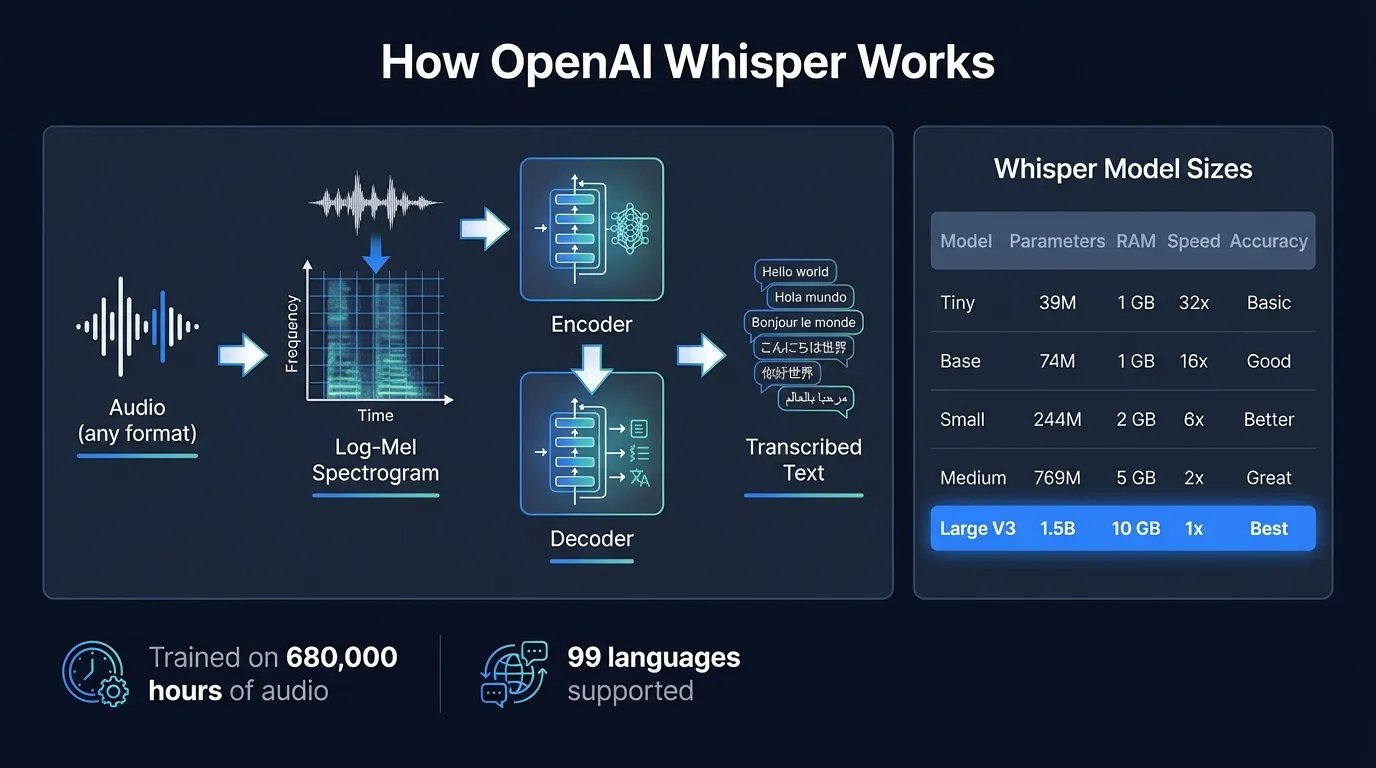
What Whisper is#
Whisper is an automatic speech recognition (ASR) system developed by OpenAI and released in September 2022. It's a neural network — specifically, an encoder-decoder transformer — trained on 680,000 hours of audio data collected from the internet. The model handles transcription, translation (speech in one language to text in another), language identification, and voice activity detection in a single model.
Three things made Whisper different from previous speech recognition systems:
It was trained with weak supervision at scale. Earlier models required carefully hand-labeled training data, which limited how much audio you could train on. Whisper used audio paired with machine-generated or loosely-verified transcripts — imperfect labels, but in enormous quantities. The scale compensated for the label quality.
It generalized without voice training. Models before Whisper required enrollment: you spoke a set of phrases so the system could learn your voice. Whisper needs no enrollment. It works on any voice, accent, or speaking style without adaptation.
It was open-source under the MIT license. OpenAI made the model weights freely available, which means any developer can use, modify, or build on top of Whisper. That decision is why Whisper is now embedded in dozens of apps, services, and open-source projects.
How Whisper works#
Whisper processes audio through a pipeline with three main steps.
Step 1: Audio preprocessing. Your audio is converted into a log-Mel spectrogram — a time-frequency representation that captures the energy at different frequencies over time. Whisper splits long recordings into 30-second chunks and processes each chunk independently.
Step 2: Encoder. The spectrogram passes through a multi-layer transformer encoder, which converts the audio representation into a dense internal representation the model can work with. The encoder's job is to extract acoustic features from the audio.
Step 3: Decoder. A transformer decoder takes the encoder's output and generates text tokens one at a time, using cross-attention to refer back to the audio representation at each step. The decoder outputs a full transcription of the 30-second chunk.
The 30-second chunk design is the primary practical trade-off in Whisper's architecture. The full context of each chunk is available to the decoder before it generates output, which helps with difficult audio — the model can use what it heard at the end of the sentence to resolve ambiguity at the beginning. The downside: you see no output until the chunk is processed. For real-time dictation, this creates a 1-2 second gap between when you stop speaking and when text appears. It's noticeable compared to streaming models, which output tokens while you're still talking.
The Whisper model family#
Whisper comes in five size tiers, each with a multilingual version and an English-only version (the English-only variants are slightly faster and more accurate for English but can't handle other languages):
| Model | Parameters | RAM (approx) | Relative speed | Notes |
|---|---|---|---|---|
| Tiny | 39M | under 1 GB | ~32x | Good for quick experiments |
| Base | 74M | under 1 GB | ~16x | Reasonable accuracy, low resources |
| Small | 244M | ~2 GB | ~6x | Better accuracy, still fast |
| Medium | 769M | ~5 GB | ~2x | High accuracy, moderate resources |
| Large V3 | 1.55B | ~3.1 GB | 1x baseline | Best accuracy in the family |
| Large V3 Turbo | 809M | ~1.5 GB | ~8x vs Large | Distilled, near-Large accuracy |
Whisper Large V3 was released in November 2023. It improved on the original Large and Large V2 models, showing 10-20% fewer errors compared to Large V2 across a wide range of languages (OpenAI, 2023). On LibriSpeech test-clean — the standard English benchmark for ASR accuracy — Large V3 achieves approximately 2.7% word error rate.
Whisper Large V3 Turbo followed in September 2024. It's a distilled version: OpenAI took the Large V3 model and reduced the decoder from 32 layers to 4, cutting the parameter count from 1.55B to 809M. The result is a model that processes audio at roughly 8 times the speed of standard Large V3 while maintaining accuracy close to the full model. For most use cases, Turbo is now the better choice when you need fast local transcription.
The speed numbers above are relative to Large V3 on server hardware. On an Apple Silicon Mac, absolute performance depends on the chip generation — but the relative ordering holds. Tiny is fast enough for real-time use; Large V3 takes 1-2 seconds per dictation segment.
What Whisper is good at#
Whisper's training approach — large-scale weakly supervised training on diverse internet audio — gave it some specific strengths.
Robustness to audio conditions. Whisper handles accented speech, background noise, varying microphone quality, and multiple speakers better than most models trained on clean data. It was trained on audio from YouTube, podcasts, and web content — not studio recordings — so it has seen a lot of messy real-world audio.
Language breadth. Whisper covers 99 languages in the Large models. About a third of the training data was non-English. Accuracy is highest for English and high-resource European languages; lower for languages with limited training data. But Whisper at least attempts transcription in all 99 — most alternative models don't come close.
Zero-shot generalization. No enrollment, no fine-tuning needed. Point it at audio it's never seen before and it transcribes. This makes it practical for apps where you can't ask every user to record a training set.
Translation. Along with transcription, Whisper can translate spoken audio directly to English text without a separate translation step. This works for any of its 99 source languages.
Continue reading
AI Transcription That Stays on Your Mac
Run Whisper and Parakeet locally with a native Mac app. No Python setup, no command line.
Where Whisper has limitations#
Honest assessment: Whisper is not the fastest or most accurate model in every scenario.
Latency for real-time dictation. The 30-second chunk architecture means you wait until each chunk is processed before seeing text. In practice with Hearsy and similar apps, you're looking at 1-2 seconds of delay after each dictation segment. For most people, this is acceptable. For fast typists accustomed to immediate feedback, it's noticeable.
English accuracy vs Parakeet. On English-language benchmarks, NVIDIA's Parakeet TDT model outperforms Whisper Large V3. Parakeet TDT 0.6B v2 achieves 1.69% WER on LibriSpeech test-clean versus Whisper's 2.7% — and processes audio at over 3,000 times real-time speed. If you dictate primarily in English and care about latency, Parakeet is faster and more accurate. The trade-off is language coverage: Parakeet covers 25 European languages versus Whisper's 99. See the Whisper vs Parakeet comparison for the full benchmark breakdown.
Repetition and hallucination on silence. Whisper occasionally generates "hallucinated" text when processing audio with long silences or non-speech audio. The 30-second chunking means if a chunk is mostly silence, the model can fill it in with plausible-sounding but wrong text. Good apps that use Whisper implement voice activity detection to avoid sending silence to the model.
Memory for Large V3. Whisper Large V3 requires roughly 3.1 GB of RAM when loaded. On 8 GB MacBook Air models, this leaves limited headroom for other applications running simultaneously. Whisper Large V3 Turbo cuts this to approximately 1.5 GB at similar accuracy — worth considering on lower-RAM machines.
Whisper vs cloud transcription#
Cloud transcription services like Otter.ai, AssemblyAI, and OpenAI's own Whisper API often use Whisper-based or Whisper-equivalent models on the server side. When you send audio to these services, you're frequently getting Whisper's transcription returned over the network — with added latency, subscription cost, and audio sent off your device.
OpenAI released GPT-4o-transcribe in early 2025, a cloud-only model with lower error rates than Whisper Large V3 on difficult audio: heavy accents, significant background noise, highly specialized vocabulary. This is a real cloud advantage for challenging recordings.
For standard dictation — clear speech in a reasonably quiet environment — Whisper Large V3 running locally matches or beats most cloud services on accuracy. The local version has no network round-trip, no per-minute cost, and audio never leaves your Mac.
For a detailed comparison of local versus cloud accuracy and trade-offs, see AI transcription: local vs cloud.
How to run Whisper on a Mac#
There are three main approaches, in order of ease of setup:
Option 1: GUI app (easiest)#
Apps like Hearsy and MacWhisper wrap Whisper in a native macOS interface. Hearsy adds real-time system-wide dictation with a hotkey; MacWhisper focuses on transcribing audio files you drop in. Neither requires touching a terminal.
For real-time dictation — pressing a hotkey and having your voice show up as text in whatever app is in focus — a GUI app is the right choice. You get Whisper's accuracy with a one-time setup and no command line.
Option 2: Python command line#
OpenAI publishes Whisper as a Python package. The setup process:
pip install openai-whisper
whisper audio.mp3 --model large-v3
Prerequisites: Python 3.8 or later, and ffmpeg for audio format conversion. Whisper via Python uses PyTorch for inference, which on Apple Silicon runs through MPS (Metal Performance Shaders). It works, but it's slower than native implementations.
This approach makes sense if you want to batch-transcribe audio files, integrate Whisper into custom scripts, or experiment with different model configurations.
Option 3: whisper.cpp#
whisper.cpp is a C++ port of Whisper that uses GGML for inference. It's significantly faster than the Python version on Apple Silicon because it uses Metal directly rather than going through PyTorch. Setup requires compiling from source:
git clone https://github.com/ggerganov/whisper.cpp
cd whisper.cpp
make
./models/download-ggml-model.sh large-v3
./main -m models/ggml-large-v3.bin -f audio.wav
This is the best option if you want maximum performance from the command line. It's slower to set up than a GUI app, but faster at inference than the Python version.
Whisper model selection in practice#
Which Whisper model to actually use depends on your hardware and use case:
For real-time dictation on any modern Mac: Whisper Large V3 Turbo gives you near-Large accuracy at much faster speed. If your app supports it, this is usually the best balance.
For maximum accuracy on English dictation: Run Parakeet instead if your app supports it. It's faster and more accurate than any Whisper model for English. Use Whisper when you need a language outside Parakeet's 25.
For multilingual transcription: Whisper Large V3 or Large V3 Turbo. The accuracy difference for non-English languages between Turbo and standard Large is smaller than the speed difference, so Turbo is usually better.
For 8 GB Mac users concerned about RAM: Small or Medium for faster loading; Large V3 Turbo if you want near-maximum accuracy without the 3.1 GB footprint of the full Large V3.
For batch processing audio files: The fastest local option is whisper.cpp with the model size appropriate for your accuracy requirement.
Whisper and privacy#
Whisper is a local model. When you run it through a GUI app, Python script, or whisper.cpp, the audio stays on your device. The model weights are downloaded once during setup; after that, no network connection is needed.
This matters more than it might seem. The alternative — sending audio to a cloud service — means your voice recordings transit over a network and are processed on servers you don't control, subject to that service's data retention policies.
For standard business use, this isn't necessarily a problem. For anyone handling confidential information — medical dictation, legal work, financial discussions, anything where what you're saying should stay private — local processing is the straightforward choice. The audio doesn't exist anywhere but your Mac.
Running Whisper locally through an app like Hearsy, you can verify this with a network monitor like Little Snitch: no outbound connections during transcription.
The Whisper ecosystem in 2026#
Since OpenAI released Whisper under the MIT license, it has become foundational infrastructure for voice applications. Apps built on Whisper include transcription tools, meeting note-takers, real-time dictation apps, accessibility software, and developer libraries across most programming languages.
The model has been fine-tuned by third parties for specific domains (medical transcription, legal dictation, call center recordings), distilled into smaller efficient variants, and ported to new inference frameworks as they've emerged. The open license meant that improvements by the community compounded: faster inference, lower memory use, better quantization — none of it gated behind a subscription.
For Mac users, Whisper is now easy to access without any command-line knowledge. A handful of good native apps ship Whisper pre-integrated with UI that handles model management, microphone input, and text output. The barrier that existed in late 2022 — "I'd use Whisper but I don't want to set up Python" — is gone.
Summary#
Whisper is OpenAI's open-source speech recognition model, released September 2022 under the MIT license. It covers 99 languages, runs entirely on-device, and achieves 2.7% word error rate on standard English benchmarks. The model family runs from Tiny (39M parameters, fast and lightweight) to Large V3 (1.55B parameters, highest accuracy). Whisper Large V3 Turbo, released September 2024, offers near-Large accuracy at approximately 8x the speed.
For Mac users who want to use Whisper without the command line, native apps provide a practical path. For real-time dictation in English, NVIDIA Parakeet is faster and more accurate — but Whisper is the right choice for multilingual work, difficult audio conditions, or when you need language coverage outside Parakeet's 25 European languages.
For how Whisper compares to NVIDIA Parakeet on benchmarks, see the Whisper vs Parakeet guide. For an overview of apps that run Whisper locally on Mac, see the best dictation software for Mac guide. For setup instructions with no command line required, see the how to run Whisper locally on Mac tutorial.
Frequently asked questions#
What is OpenAI Whisper?#
OpenAI Whisper is an automatic speech recognition system released in September 2022 under the MIT license. It's an encoder-decoder transformer trained on 680,000 hours of multilingual audio data collected from the internet. Whisper supports 99 languages, requires no voice enrollment, and runs entirely on-device after downloading the model weights. It handles transcription, speech translation to English, language identification, and voice activity detection in a single model.
Which Whisper model is most accurate?#
Whisper Large V3, released November 2023, achieves approximately 2.7% word error rate on LibriSpeech test-clean — the most accurate model in the family. For most users, Whisper Large V3 Turbo (September 2024) is a better choice: it uses 809M parameters versus 1.55B, loads in roughly half the RAM, and runs at about 8 times the speed of standard Large V3 while maintaining similar accuracy.
How do I run Whisper on a Mac?#
Three options, in order of ease: (1) A GUI app like Hearsy or MacWhisper — download, install, and use with no terminal required. (2) The Python package — pip install openai-whisper — then whisper audio.mp3 --model large-v3 from the command line. (3) whisper.cpp — a C++ port that compiles to a fast native binary using Apple's Metal GPU API. For real-time dictation, GUI apps are the practical choice. For batch file processing, whisper.cpp gives the best raw performance.
Does Whisper work offline on Mac?#
Yes. After downloading the model weights (39 MB for Tiny, 3.1 GB for Large V3), Whisper runs with no internet connection. Audio is processed on your device and never leaves your Mac. This is different from cloud transcription services, which transmit audio to remote servers. You can verify no network requests occur by monitoring traffic with Little Snitch during transcription.
What is the difference between Whisper and OpenAI's transcription API?#
OpenAI's transcription API sends audio to OpenAI's servers and returns a transcription. Whisper, the open-source model, runs locally on your device. The API is convenient for cloud-based apps but charges per minute and transmits audio off-device. Running Whisper locally keeps audio on your Mac, requires no subscription, and works offline. OpenAI's API uses whisper-1, a Whisper-based model, plus the newer GPT-4o-transcribe model which has a cloud accuracy advantage on difficult audio conditions.
Ready to Try Voice Dictation?
Hearsy is free to download. No signup, no credit card. Just install and start dictating.
Download Hearsy for MacmacOS 14+ · Apple Silicon · Free tier available
Related Articles
Whisper vs Parakeet: Speed, Accuracy, and Language Support
10 min read
Whisper Large V3 vs V3 Turbo: Speed, Accuracy, Memory
10 min read
How to Run Whisper Locally on Mac (Without the Command Line)
8 min read
How to Convert Audio to Text on Mac: 5 Methods Compared
14 min read
Best Whisper Apps for Mac in 2026: 7 Apps Compared
17 min read