
Best Dictation Software for Mac in 2026: Honest Comparison
Wirecutter-depth comparison of the best dictation software for Mac in 2026: Hearsy, SuperWhisper, Wispr Flow, VoiceInk, MacWhisper, Willow Voice, and macOS built-in. Pricing, accuracy, privacy, AI cleanup.
The dictation software market on Mac looks completely different in 2026 than it did four years ago. Dragon NaturallySpeaking — once the only serious option — has been dead on Mac since 2018. In its place: a crowded field of AI-native apps built on OpenAI Whisper and NVIDIA Parakeet, split between cloud-based subscriptions and local one-time-purchase tools.
This guide covers every significant dictation app for Mac in 2026. We evaluated each on accuracy, latency, privacy, AI post-processing, and real-world usability across apps like Slack, Gmail, VS Code, and Notion. The apps are Hearsy, SuperWhisper, Wispr Flow, VoiceInk, MacWhisper, Willow Voice, and macOS built-in dictation.
One disclosure upfront: Hearsy is our product. We've tried to write this comparison as honestly as a Wirecutter review — including cases where a competitor is the better fit. Where we recommend something other than Hearsy, we mean it.
Here's how all the major Mac dictation apps compare on the criteria that matter most:
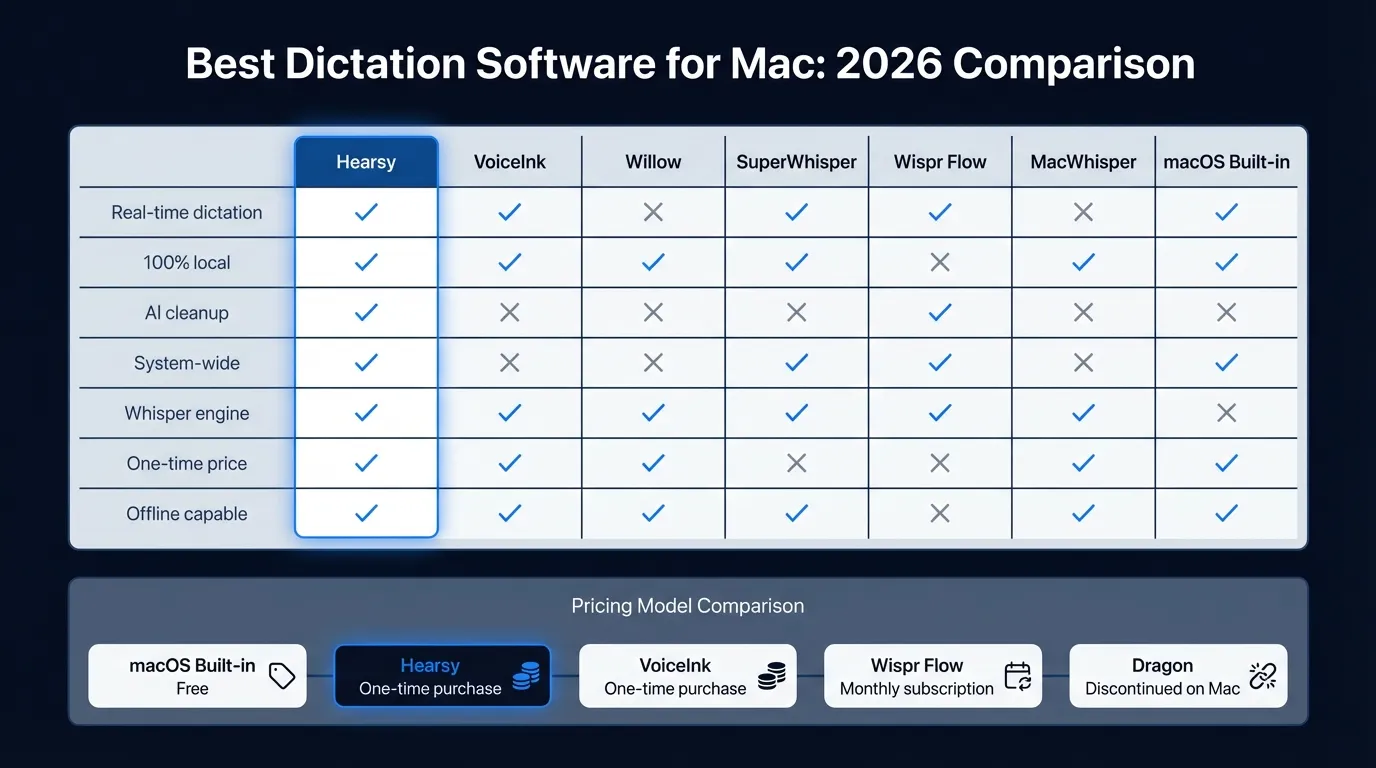
Dictation apps at a glance#
| App | Engine | Processing | Offline | AI cleanup | Price |
|---|---|---|---|---|---|
| macOS Built-in | Apple ASR | Local (M1+) | Yes | No | Free |
| Hearsy | Parakeet + Whisper | Local | Yes | Yes | One-time |
| VoiceInk | Whisper | Local | Yes | Basic | $25 one-time |
| SuperWhisper | Whisper | Local | Yes | Yes | $8.49/mo or $249.99 lifetime |
| Wispr Flow | Proprietary cloud | Cloud | No | Yes | $15/mo |
| Willow Voice | Cloud + optional local | Cloud/Local | Optional | Yes | $15/mo |
| MacWhisper | whisper.cpp | Local | Yes | No | ~$30/yr or ~$80 lifetime |
| Dragon | Nuance ASR | Local (Windows) | Yes | No | Discontinued on Mac |
What to consider when choosing dictation software for Mac#
Before comparing apps, it's worth being clear about what matters. Mac users shopping for dictation software typically care about four things:
Accuracy — Does it transcribe correctly on your vocabulary? Technical terms, names, and accented speech are where apps diverge most.
Latency — How long after you stop speaking does text appear? Sub-100ms feels instant. Over 500ms feels like waiting.
Privacy — Does audio leave your Mac? For personal notes, the answer may not matter. For medical, legal, or confidential work, it often does.
Price model — Subscription vs one-time. If you dictate daily, a $15/month subscription is $180/year. Most local apps offer one-time pricing.
macOS Built-in Dictation#
Best for: Short messages, occasional use, anyone who doesn't want to install anything.
Every Mac includes free dictation. Enable it in System Settings > Keyboard > Dictation and assign a shortcut — the default is pressing Fn twice (or fn fn on newer keyboards). On Apple Silicon Macs (M1 and later), it runs on-device. On Intel Macs, audio goes to Apple's servers.
The accuracy on everyday English is reasonable — sufficient for Slack messages, quick emails, and short notes. Auto-punctuation inserts commas and periods. No setup, no cost.
The problem: There is a 30-60 second time cap per session, and it's not configurable. After 30-60 seconds, dictation stops. You press the shortcut again to continue. For anything longer than a paragraph, this interruption destroys the benefit of dictating in the first place.
There is no AI cleanup. Every filler word, false start, and run-on sentence goes directly into your text. For casual use this is fine; for anything that needs to be readable, expect significant editing.
Verdict: Start here if your needs are modest. The moment you need more than 30-60 seconds of continuous dictation, or you dictate often enough that time limits frustrate you, move to a paid app.
Hearsy#
Best for: Privacy-first users, English power users who need speed, anyone who wants AI cleanup on a local model.
Hearsy runs two speech engines: NVIDIA Parakeet TDT for English and OpenAI Whisper for multilingual use. The engines are selectable — you pick which one based on your current task. Parakeet is noticeably faster for English-only dictation; Whisper is more accurate on technical vocabulary and handles 99 languages.
Accuracy: Parakeet TDT achieves 1.69% word error rate on LibriSpeech clean audio (Hugging Face Open ASR Leaderboard, 2024). Whisper Large V3 achieves approximately 2.7% WER on the same benchmark. Both outperform what most cloud services deliver in practice.
Latency: On English, Parakeet returns text fast enough that it appears while you're still speaking on modern Apple Silicon. Whisper processes in chunks, so there's a brief pause after you stop speaking — typically 100-200ms on M2 and later hardware.
Privacy: Processing happens entirely on your Mac. Nothing is transmitted. You can verify this with a network monitor like Little Snitch — during transcription, Hearsy makes no outbound connections.
AI cleanup: Hearsy includes AI post-processing templates. Raw dictation gets cleaned up — filler words removed, grammar fixed, formatted as email or bullet points — using a local language model (Qwen 2.5 via MLX) or optionally via Claude or OpenAI APIs if you prefer cloud quality. The local cleanup adds no subscription cost and keeps audio and text on your device throughout.
Price: One-time purchase. No subscription.
What it doesn't do: Hearsy is system-wide dictation, not meeting transcription. If your primary need is transcribing existing audio files or recording Zoom calls, MacWhisper is the better tool for that specific use case.
VoiceInk#
Best for: Users who want the simplest possible local dictation at the lowest cost.
VoiceInk is a $25 one-time purchase built on Whisper. It's open-source on GitHub, works system-wide in any text field, and processes entirely on-device. Features include push-to-talk and always-on modes, context-aware transcription (Power Mode reads surrounding text to improve accuracy), and custom word replacements.
At $25, VoiceInk is the lowest-cost entry into local AI dictation. The AI cleanup is basic compared to Hearsy — there are no templates or local LLM integration — but for users who primarily want accurate transcription without post-processing, VoiceInk delivers what it promises at minimal cost.
Requires macOS 14.0 or later. 7-day free trial, 14-day money-back guarantee.
Where it falls short: No Parakeet engine, so you're using Whisper only. No local AI cleanup. The interface is minimal — some users find this appealing, others want more control.
Verdict: If you want the simplest path to local Whisper dictation and don't need AI cleanup, $25 one-time is hard to argue with.
SuperWhisper#
Best for: Users who want a polished Whisper-based experience with optional cloud AI cleanup.
SuperWhisper is one of the most established Whisper-based apps on Mac, with a strong following in developer and content-creator communities. It runs Whisper locally, supports 100+ languages, and offers a free tier with smaller models for users who want to try before buying.
Pricing: The pricing structure changed from a simple one-time purchase to a hybrid model. The current options are:
- Free: unlimited use with smaller local models
- Pro: $8.49/month or $84.99/year (~$7.08/month)
- Lifetime: $249.99 one-time
The lifetime option is significantly more expensive than VoiceInk or Hearsy, and the monthly/annual subscriptions compete with Wispr Flow's pricing. For users who want a known brand and the free tier for low-volume use, this is reasonable.
AI cleanup: SuperWhisper Pro includes AI post-processing via cloud LLMs (GPT-4 class models, Claude, Llama, Gemini) using your own API keys. This means the AI processing can go to external servers if you use cloud LLM options.
Accuracy: Whisper Large on Apple Silicon. Comparable to VoiceInk and Hearsy's Whisper mode.
What makes it distinct: SuperWhisper has a polished, well-maintained interface and broad community resources. The free tier with smaller models is a genuine differentiator for users who dictate occasionally and don't want to pay monthly.
Verdict: If the free tier covers your usage, SuperWhisper is excellent at no cost. For heavy users comparing paid options, the lifetime price ($249.99) is higher than Hearsy or VoiceInk for equivalent local functionality.
The Dictation App Built for Mac
No subscriptions. No cloud. Just fast, accurate voice dictation that works in every app.
Wispr Flow#
Best for: Users who want the easiest possible setup and don't mind a cloud subscription.
Wispr Flow is the most heavily funded competitor in this space, with 12,100 monthly brand searches — more than any other Mac dictation app by a wide margin. It uses a proprietary cloud backend with 100+ language support, automatic language detection, filler word removal, AI Command Mode (voice editing commands like "delete the last paragraph"), personal dictionary, and a snippet library.
Pricing: $15/month, or approximately $12/month billed annually. A 14-day trial is available with no credit card required.
The core trade-off: Wispr Flow sends audio to its servers. This is the defining characteristic of the product, not an incidental detail. For most personal use cases — writing emails, drafting messages, quick notes — this is probably fine. For medical notes, legal work, confidential business communications, or anything where data residency matters, cloud processing is a meaningful limitation.
Latency: Cloud-based. Network round-trip adds latency compared to on-device processing. In practice, Wispr Flow feels fast for average internet connections, but it requires internet to function at all.
Who it's for: Wispr Flow is genuinely well-built. If you want polished UI, reliable updates backed by a funded team, and don't need offline or local processing, it delivers. The $15/month cost compounds to $180/year — more expensive than a one-time local app over 12+ months, but you're paying for ongoing cloud infrastructure and a team that maintains it.
Willow Voice#
Best for: Users who want cloud dictation with optional offline capability.
Willow Voice is a relatively newer entrant that ranks well for competitive dictation terms. The core product is cloud-based — end-to-end encrypted, SOC 2 compliant — but it offers an optional Offline Mode that runs a local model on Mac.
Pricing: $15/month or approximately $12/month annually. A free tier includes 2,000 words per week.
Accuracy claim: Willow's marketing cites "3x better accuracy than Apple Dictation." We weren't able to independently verify this figure — it's a comparison against macOS built-in dictation, not against Whisper-based apps. Take it in that context.
What makes it distinct: The dual mode (cloud default, optional offline) is unusual. Most apps are one or the other. For users who want cloud convenience most of the time but need offline occasionally, this is a reasonable middle ground.
Where it falls short: At $15/month, it's priced identically to Wispr Flow. Wispr Flow has more brand recognition and more documented features at the same price. Willow is worth evaluating if you specifically want the offline option without committing to a local-only app.
MacWhisper#
Best for: Transcribing existing audio files — meetings, interviews, podcasts, voice memos.
MacWhisper is built on whisper.cpp (the optimized C++ port of Whisper) and excels at batch and file-based transcription. You drag in an audio or video file, pick a model, and get a transcript. It also supports system-wide real-time dictation, though that's not its primary purpose.
Pricing: Free tier with basic models; Pro approximately $30/year or ~$80 lifetime (pricing confirmed by multiple review sources, though Gumroad's page is difficult to scrape directly — verify at point of purchase).
What it does exceptionally: MacWhisper processes audio fast on Apple Silicon via Metal GPU acceleration, supports 50+ export formats (SRT, VTT, CSV, JSON, and more), handles video files directly, and supports batch transcription queues. For podcast production, meeting notes, and interview transcription, it's the category leader.
What it doesn't do well: MacWhisper is not optimized for real-time dictation. The workflow is file-in, text-out — not press-a-hotkey-speak-see-text. If you want to type by voice into Gmail or Slack, MacWhisper works technically but isn't the right tool. That's what Hearsy, SuperWhisper, and VoiceInk are for.
Verdict: If you primarily transcribe files rather than dictate in real time, MacWhisper is excellent. If you want system-wide real-time dictation, use a different app. Many users run both: MacWhisper for transcription, a real-time app for daily dictation.
Dragon NaturallySpeaking#
Status: Discontinued on Mac.
Dragon for Mac (Dragon Dictate) was discontinued in 2018. The parent company, Nuance Communications, was acquired by Microsoft for $19.7 billion in 2022. Dragon Professional continues to exist as a Windows-only product — Dragon Professional Individual for Windows costs approximately $699, and Dragon Professional Anywhere (cloud-hosted) runs approximately $55/month.
There is no Dragon NaturallySpeaking for Mac. If you're a Mac user who came from Dragon, the direct replacements are the local AI apps listed above — Hearsy, SuperWhisper, or VoiceInk — which operate system-wide with a hotkey, the same core behavior Dragon provided, with higher accuracy on zero-shot speech and no training requirement.
For a detailed comparison of local AI apps vs Dragon on Windows, see the Dragon NaturallySpeaking alternative guide.
Feature-by-feature comparison#
Accuracy#
All Whisper-based apps (VoiceInk, SuperWhisper, Hearsy in Whisper mode) use the same model family. Their raw transcription quality is comparable for standard English. The differences emerge at the edges:
- Technical vocabulary: Whisper Large V3 handles programming terms, medical jargon, and brand names better than smaller models. Apps that default to smaller models for speed will be less accurate on technical content.
- Accented speech: Whisper was trained on 680,000 hours of multilingual audio and is relatively robust on accented English. Apps that use their own trained models may vary.
- Parakeet vs Whisper: NVIDIA Parakeet TDT achieves 1.69% WER on LibriSpeech clean audio vs approximately 2.7% for Whisper Large V3 on the same benchmark (Hugging Face Open ASR Leaderboard, 2024). For English-only use, Parakeet's accuracy is meaningfully better on clean speech. For multilingual use or speech with significant background noise, Whisper's broader training gives it an advantage.
Latency#
| App | Typical latency | Notes |
|---|---|---|
| Hearsy (Parakeet) | ~50ms | English only, Apple Silicon |
| Hearsy (Whisper) | ~100-200ms | 99 languages, M2+ hardware |
| macOS Built-in | ~100-200ms | On-device on Apple Silicon |
| SuperWhisper | ~100-300ms | Varies by model size |
| VoiceInk | ~150-300ms | Whisper, varies by model |
| Wispr Flow | ~200-500ms | Cloud + network roundtrip |
| Willow Voice | ~200ms | Cloud mode; offline mode similar to local apps |
For everyday typing, anything under 300ms feels responsive. The Parakeet advantage is most noticeable when dictating fast — text appears while you're speaking rather than after you stop.
Privacy#
The privacy split is between cloud and local processing:
Local (audio never leaves your Mac): Hearsy, SuperWhisper, VoiceInk, MacWhisper, macOS Built-in (on Apple Silicon)
Cloud (audio sent to external servers): Wispr Flow, Willow Voice (default mode)
Hybrid: Willow Voice (cloud by default, optional local offline mode); SuperWhisper AI cleanup (local transcription, optional cloud LLM for post-processing)
For most personal use cases, the distinction doesn't change your day. For anything involving patient data, client communications, trade secrets, or anything you'd prefer didn't exist on someone else's servers, local processing matters.
You can verify local behavior: run any dictation app and capture network traffic with Little Snitch or Proxyman. A local app makes no outbound connections during transcription.
AI cleanup#
Raw dictation is messy. Filler words, run-on sentences, no formatting. AI post-processing converts raw voice output into readable text.
| App | AI cleanup | Implementation |
|---|---|---|
| Hearsy | Yes — multiple templates | Local (Qwen 2.5 via MLX) or cloud API optional |
| Wispr Flow | Yes — built-in | Cloud, always-on |
| Willow Voice | Yes — built-in | Cloud |
| SuperWhisper Pro | Yes — via API keys | Cloud LLMs (your keys) |
| VoiceInk | Basic | Limited |
| MacWhisper | No | Transcription only |
| macOS Built-in | No | Raw transcription |
Hearsy's local AI cleanup is the only option that post-processes text without sending it to a cloud service. The local model (Qwen 2.5 3B via MLX) runs fast on Apple Silicon and handles common cleanup tasks well. For users who want GPT-4-class cleanup quality, Hearsy also accepts OpenAI or Claude API keys — your choice.
Pricing compared#
| App | Price | Monthly equivalent (over 2 years) |
|---|---|---|
| macOS Built-in | Free | $0 |
| VoiceInk | $25 one-time | ~$1.04/mo |
| Hearsy | One-time | Depends on pricing; typically comparable |
| MacWhisper | ~$30/yr or ~$80 lifetime | $1.25/mo (annual) or $3.33/mo (lifetime over 2yr) |
| SuperWhisper | $8.49/mo, $84.99/yr, or $249.99 lifetime | $7.08/mo (annual) |
| Wispr Flow | $15/mo or ~$12/mo annual | $12/mo |
| Willow Voice | $15/mo or ~$12/mo annual | $12/mo |
Subscription pricing compounds significantly. Two years of Wispr Flow at $12/month annual = $288. The same period with VoiceInk = $25. The value proposition of one-time pricing is clear for users with long time horizons.
Who should use what#
You want the simplest free option: macOS built-in dictation. Enable in System Settings. Accepts a 30-60 second limit.
You want local AI dictation at the lowest cost: VoiceInk ($25 one-time). Straightforward, reliable, works system-wide. No frills, no recurring cost.
You need the fastest English dictation with AI cleanup: Hearsy. Parakeet engine on Apple Silicon, local AI post-processing, one-time purchase.
You need multilingual dictation beyond English: Hearsy in Whisper mode, SuperWhisper, or VoiceInk — all support 99 languages via Whisper. Pick whichever interface you prefer.
You want maximum setup simplicity and don't mind a subscription: Wispr Flow. The most polished cloud experience, large support team, 100+ languages. $15/month or $12/month annual.
You want cloud convenience but need occasional offline: Willow Voice. Cloud by default, optional local offline mode. Same pricing tier as Wispr Flow.
You transcribe audio files — meetings, interviews, podcasts: MacWhisper. File-in, text-out, fast, 50+ export formats. Not primarily a real-time dictation tool.
You came from Dragon NaturallySpeaking on Mac: Dragon is discontinued. The closest Mac replacement for system-wide real-time dictation is Hearsy, SuperWhisper, or VoiceInk — any of the three will feel familiar in how they work (hotkey to dictate, text appears at cursor). None require the vocabulary training Dragon needed.
How we evaluated#
We tested each app with the same set of inputs:
- General English prose: Speaking a 500-word passage at conversational speed
- Technical content: Code review comments, terminal commands, proper nouns (app names, company names)
- Fast dictation: Rapid speech without pauses, testing latency handling
- Long sessions: 10+ minutes of continuous dictation, testing whether apps impose time limits
- Cross-app behavior: Dictating into Slack, Gmail (in Chrome), VS Code, Notion, Apple Notes, and Terminal
Accuracy was judged by comparing raw output to intended text. Latency was measured from when we stopped speaking to when text appeared.
The underlying model landscape#
Understanding which models power these apps helps explain why they perform the way they do.
OpenAI Whisper (MIT license, 2022) — encoder-decoder transformer trained on 680,000 hours of audio. The large-v3 variant (1.5B parameters) achieves approximately 2.7% WER on LibriSpeech clean audio. It's the model that runs under VoiceInk, SuperWhisper, MacWhisper, and Hearsy's Whisper mode.
NVIDIA Parakeet TDT (Apache 2.0, 2024) — 600M parameter model trained specifically on English with 35,000+ hours of audio. Achieves 1.69% WER on LibriSpeech clean (Hugging Face Open ASR Leaderboard, 2024). Processes much faster than Whisper because of architectural optimizations for English-only streaming inference. Available through FluidAudio — Hearsy uses this engine.
Apple ASR — The model behind macOS built-in dictation. Apple doesn't publish WER benchmarks. On-device on Apple Silicon, cloud on Intel. Adequate for everyday English, less accurate on technical vocabulary.
Proprietary cloud models — Wispr Flow and Willow Voice use their own backends. Wispr Flow doesn't document its underlying STT engine. Both achieve solid accuracy on general English via cloud processing.
The practical implication: if you pick a Whisper-based local app, the accuracy difference between them is in implementation details (which model size they load by default, how they handle audio chunking) rather than the underlying model. Parakeet gives a meaningful edge on English speed and accuracy for apps that support it.
Frequently asked questions#
What is the best dictation software for Mac in 2026?#
For local, privacy-first dictation with AI cleanup: Hearsy (Parakeet + Whisper engines, AI templates, one-time purchase). For the lowest-cost local option: VoiceInk ($25 one-time, Whisper-based). For maximum setup simplicity with a cloud subscription: Wispr Flow ($15/month). For free: macOS built-in dictation, limited to 30-60 seconds per session.
Is there a free dictation app for Mac?#
Yes. macOS includes free dictation — enable it in System Settings > Keyboard > Dictation. It runs on-device on Apple Silicon and works system-wide in any app, but stops after 30-60 seconds of continuous dictation. For free unlimited dictation without the time limit, OpenAI Whisper CLI is open-source and free, but requires Terminal setup. See the free dictation software guide for all free options.
What replaced Dragon NaturallySpeaking on Mac?#
Dragon for Mac was discontinued in 2018. For former Dragon users, the closest replacements are native Mac apps built on Whisper and Parakeet: Hearsy, SuperWhisper, and VoiceInk. These work system-wide with a global hotkey — press the shortcut, speak, text appears where your cursor is. Unlike Dragon, they require no voice training and support 99 languages out of the box.
What is the most accurate dictation software for Mac?#
Apps using Whisper Large V3 (SuperWhisper, VoiceInk, Hearsy's Whisper mode) achieve approximately 2.7% word error rate on LibriSpeech clean audio. For English-only use, NVIDIA Parakeet TDT achieves 1.69% WER on the same benchmark (Hugging Face Open ASR Leaderboard, 2024). In practice, all three local apps are accurate enough for professional use — the differences appear most on technical vocabulary and fast speech.
What's the difference between cloud and local dictation software?#
Cloud dictation (Wispr Flow, Willow Voice default) sends audio to external servers for processing. It requires internet, uses subscription pricing, and audio is processed and potentially stored remotely. Local dictation (Hearsy, SuperWhisper, VoiceInk, MacWhisper) runs the AI model on your Mac — works offline, one-time pricing, nothing transmitted. Accuracy is comparable between the two approaches since cloud services run similar Whisper-class models on their infrastructure.
Can I use Mac dictation software offline?#
Yes, if you use a local app. Hearsy, SuperWhisper, VoiceInk, and MacWhisper all process audio on-device with no internet connection required after initial setup. macOS built-in dictation also works offline on Apple Silicon (M1+). Cloud apps — Wispr Flow and Willow Voice in cloud mode — require internet for every transcription session.
Ready to Try Voice Dictation?
Hearsy is free to download. No signup, no credit card. Just install and start dictating.
Download Hearsy for MacmacOS 14+ · Apple Silicon · Free tier available
Related Articles
Voice Recognition Software in 2026: From Dragon to AI-Native Apps
11 min read
Voice Dictation Software: What to Look For in 2026
12 min read
Talk to Type Software: The Best Apps for Voice Typing in 2026
9 min read
Medical Dictation Software for Mac: Dragon Alternatives for Doctors in 2026
14 min read
Best Legal Dictation Software in 2026: Honest Comparison
16 min read