
Best Free Dictation Software for Mac in 2026
Every free dictation option for Mac — from macOS built-in to open-source Whisper — with honest coverage of what works and where each one falls short.
There are exactly two ways to get unlimited, real-time voice dictation on a Mac for free. One requires no setup. The other requires you to be comfortable in Terminal. Everything else either has time limits, works only in a browser, or handles meeting transcription instead of live typing.
This guide covers every free dictation option for Mac — what each one actually does, its real limitations, and which ones are worth your time.
Here's how every free dictation option stacks up:
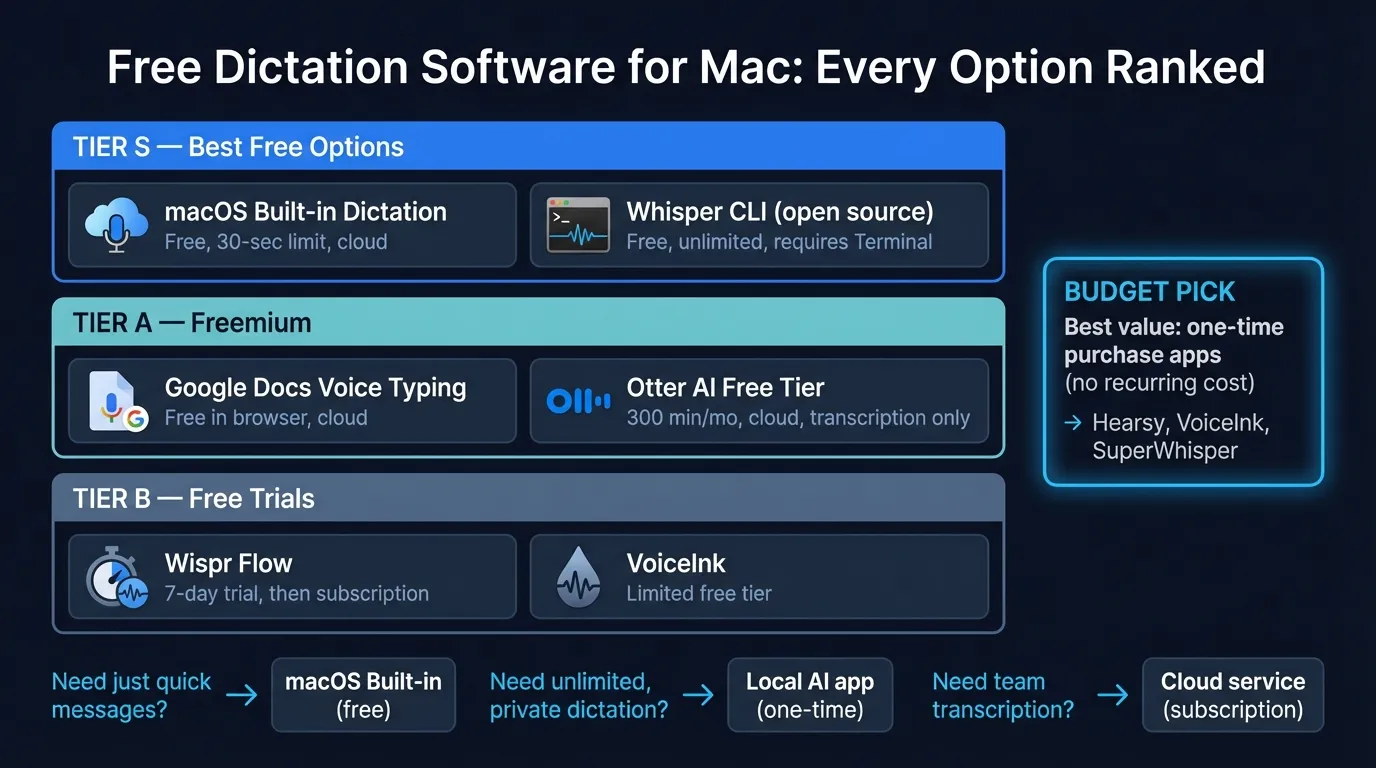
Free dictation options at a glance#
| Option | Time limit | Works system-wide | Cloud or local | Setup effort |
|---|---|---|---|---|
| macOS Built-in Dictation | ~30-60 sec | Yes | Local (M1+) | None |
| Google Docs Voice Typing | None | No (Docs only) | Cloud | None |
| OpenAI Whisper CLI | None | No (file-based) | Local | High |
| whisper.cpp | None | No (file-based) | Local | High |
| OpenWhispr (open source) | None | Yes | Local | Medium |
| Otter.ai Basic | 300 min/mo | No (meetings only) | Cloud | Low |
| Dictation.io | None | No (browser only) | Cloud | None |
If you need system-wide dictation with no time limit and no technical setup, you're looking at a paid app. If you can work within one of these constraints, read on.
macOS built-in dictation#
Best for: Short messages, occasional dictation, users who don't want to install anything.
macOS includes free dictation on every Mac. Setup takes about 30 seconds: System Settings > Keyboard > Dictation > toggle on.
On Apple Silicon Macs (M1 and later), dictation runs on-device. Nothing leaves your Mac. On Intel Macs, audio goes to Apple's servers for processing. The on-device model on recent hardware is solid for everyday English — accuracy runs in the 90-92% range on general speech according to third-party testing, though Apple doesn't publish official word error rate numbers.
What it does well:
- Works in any app with a text input: Mail, Slack, Notes, Chrome, VS Code, anywhere
- Auto-punctuation inserts commas and periods automatically
- No cost, no download, no configuration
- On Apple Silicon, genuinely private — audio stays on your Mac
The hard limits:
The 30-60 second time cap is the primary problem. Built-in dictation stops listening after roughly 30-60 seconds of continuous speech — this behavior has persisted across multiple macOS versions, and Apple hasn't documented any way to extend it. You press the shortcut again to continue, which interrupts your flow constantly for anything longer than a paragraph.
There's no text cleanup. Every "um," every false start, every run-on sentence goes directly into your document. And accuracy on technical vocabulary — programming terms, medical jargon, brand names — drops noticeably compared to general English.
For quick messages, Slack replies, and short emails, macOS dictation is probably all you need. For anything requiring sustained dictation, the time cap makes it impractical.
Google Docs voice typing#
Best for: Long-form writing inside Google Docs, in Chrome.
Google Docs includes its own voice typing, separate from macOS dictation. Go to Tools > Voice Typing (or press Cmd+Shift+S), click the microphone icon, and speak. Unlike macOS built-in dictation, it doesn't stop after 30 seconds. You can speak for extended periods without interruption.
Audio gets sent to Google's servers for processing, so you need an active internet connection. The accuracy is reasonable for everyday English — comparable to other cloud-based speech recognition — but drops on technical vocabulary, accented speech, and proper nouns. Google doesn't publish accuracy metrics, and the voice typing model doesn't learn from your corrections.
What it does well:
- No time limit
- Free, no installation required
- Good enough accuracy for general prose
The limits:
It only works inside Google Docs, in Chrome. Not in Safari, not in Firefox, not in any other app. If you need to dictate an email in Mail, a message in Slack, or text in any non-Docs app, Google voice typing can't help.
It's also cloud-only. Every word you speak goes to Google. That's a meaningful privacy distinction if you're dictating anything confidential.
If your writing lives in Google Docs and you use Chrome, this covers long-form dictation at zero cost. If you work across multiple apps, it's the wrong tool.
OpenAI Whisper CLI#
Best for: Developers and technical users who want maximum accuracy without paying.
OpenAI Whisper is the open-source speech recognition model that powers most modern dictation apps. It's MIT-licensed, free, and runs entirely on your Mac. Whisper Large V3 achieved 4.2% word error rate on the LibriSpeech clean test set (OpenAI, 2023), which approaches professional transcription accuracy. It supports 99 languages.
Installing Whisper via pip:
pip install openai-whisper
Or via Homebrew:
brew install openai-whisper
Usage is file-based — record an audio file, then transcribe it:
whisper recording.m4a --model large-v3
Whisper model sizes#
Whisper comes in five model sizes. Smaller models are faster but less accurate:
| Model | Size | RAM usage | Speed (M2 MacBook Pro) | Best for |
|---|---|---|---|---|
| tiny | 75 MB | ~0.4 GB | Very fast | Quick notes, testing |
| base | 142 MB | ~0.6 GB | Fast | Casual use |
| small | 466 MB | ~1.2 GB | Moderate | Good balance |
| medium | 1.5 GB | ~2.1 GB | Slower | High accuracy needs |
| large-v3 | 3 GB | ~3.1 GB | ~2.3x real-time | Best accuracy |
For most purposes, medium is the best trade-off. large-v3 is worth it for technical vocabulary or accented speech where accuracy matters most.
The major limitation: Whisper doesn't do real-time dictation out of the box. You record audio, then transcribe the file. There's no typing-as-you-speak. Getting real-time behavior requires either whisper.cpp with streaming mode or a GUI wrapper.
Whisper CLI is excellent for transcribing meeting recordings, podcasts, voice memos, and interview audio. For day-to-day typing by voice in other apps, it's the wrong fit.
The Dictation App Built for Mac
No subscriptions. No cloud. Just fast, accurate voice dictation that works in every app.
whisper.cpp — Faster local inference#
Best for: Technical users who want lower-latency Whisper with less memory overhead.
whisper.cpp is a C++ port of Whisper optimized for Apple Silicon. It loads significantly faster than the original Python implementation and uses less memory — approximately 1.9 GB RAM for the large model versus 3.1 GB for the Python version, based on benchmarks in the whisper.cpp repository.
whisper.cpp supports a streaming mode that enables near-real-time transcription from your microphone, though enabling it requires building from source and configuring the stream example. It's the foundation that apps like MacWhisper are built on.
Setup is more involved than pip install. You clone the repository, compile the code, and download model files manually. Check the whisper.cpp GitHub for current build instructions, since these change as the project evolves.
Like the Python Whisper CLI, whisper.cpp doesn't paste text into other apps on its own. For system-wide dictation, you'd need to add that logic yourself or use one of the open-source apps below.
Open-source GUI apps built on Whisper#
Best for: Users who want free, local Whisper-based dictation with a real interface.
Several open-source projects wrap Whisper in a macOS-native interface and add the clipboard-paste behavior that makes system-wide dictation possible:
OpenWhispr — MIT-licensed, runs Whisper and Parakeet locally, global hotkey activation, works in any Mac app via clipboard paste. The most complete free option for real-time dictation. Available on GitHub.
OpenWispr — Similar approach: local Whisper models, privacy-first, cross-platform support. Requires slightly more setup.
WhisperDesk — Lightweight macOS app for Whisper, oriented toward file transcription rather than real-time dictation.
The tradeoff with open-source apps is maintenance. These are community projects maintained by individual developers. Stability and update frequency vary. When something breaks after a macOS update, there's no support team — you check the GitHub issues and wait for a fix.
If you're comfortable with open-source software and want the closest thing to free real-time dictation with no time limit, OpenWhispr is worth trying first.
Otter.ai free tier#
Best for: Meeting transcription. Not real-time dictation.
Otter.ai appears in searches for free dictation software, but it's a different category of tool. Otter transcribes meetings — Zoom calls, in-person conversations, audio recordings. It doesn't do real-time dictation into other apps. You can't use Otter to type an email or write in Notion by speaking.
The free tier includes 300 minutes of transcription per month (down from 600 minutes since late 2022), a 30-minute cap per conversation, English only, and 30-day storage retention. Audio is sent to Otter's servers.
If your need is meeting notes or recording transcription, the free tier is useful. If you want to type by voice in your apps, it's not the right tool — and it's worth being clear about that distinction before you spend time setting it up.
Dictation.io#
Best for: One-off dictation in a browser without installing anything.
Dictation.io is a browser-based voice typing tool. Open the website, click the microphone, and speak — text appears on screen and you copy it out. It uses the Web Speech API (Google's speech recognition in Chrome) and requires an internet connection.
Accuracy is comparable to Google Docs voice typing, which means good for everyday English and inconsistent on technical terms. The main use case: you're on a shared or unfamiliar Mac, you need to dictate something quickly, and you have no apps installed. It's a narrow scenario, but sometimes that's exactly what you need.
When free stops working#
Free dictation software handles common cases but has consistent failure modes:
You need more than 30-60 seconds of continuous speech. macOS built-in stops. The open-source CLI tools don't stop, but they require technical setup and don't paste text into other apps without extra work.
You need to dictate into multiple apps. Google Docs voice typing works only in Docs. Otter handles meeting recordings. Only macOS built-in and the open-source GUI apps work system-wide — the former with a time limit, the latter with varying stability.
You need accuracy on technical content. The browser tools struggle with programming terms, medical vocabulary, and anything outside common English. Whisper handles technical content well, but it takes time to set up.
You want text cleanup. No free option removes filler words, fixes grammar, or reformats your dictation as clean prose. That's an AI post-processing step that only paid apps include.
You need reliability without maintenance. Open-source apps occasionally break after macOS updates. macOS built-in dictation has its own bugs. If you're using dictation as a core part of your workflow, a maintained app matters.
When you hit these walls consistently, the practical option is a paid app with one-time pricing. Hearsy, VoiceInk, and SuperWhisper use the same underlying Whisper and Parakeet models as the open-source tools — but packaged as apps that install in two minutes, update automatically, and work reliably across macOS versions. The value isn't access to a different model. It's the packaging, the reliability, and not having to maintain your own setup.
For a full comparison of all dictation apps including paid options, see the best dictation software for Mac guide. For setup steps specifically, the voice recognition setup guide covers the entire process from download to first dictation.
Which option to pick#
Quick messages, nothing to install: macOS built-in dictation. Free, system-wide, works in any app, 30-60 second limit.
Long-form writing in Google Docs: Google Docs voice typing. Free, Chrome only, no time limit, cloud-based.
Technically inclined, want maximum accuracy: OpenAI Whisper CLI with the large-v3 model. Free, file-based, 4.2% WER, handles 99 languages.
Want a free GUI app with real-time dictation: OpenWhispr. Free, community-maintained, system-wide via hotkey, local processing.
Meeting transcription, not typing: Otter.ai Basic. 300 min/month, English only.
None of the above fit your workflow: One-time purchase app, no subscription, same underlying models with a stable interface.
The free options cover a lot of ground. macOS built-in handles most casual use cases. Whisper CLI handles technical accuracy needs. The gap is the middle — unlimited, system-wide, real-time dictation that just works — and that's where the free options fall short.
For more on how speech recognition has evolved on Mac, see the speech to text on Mac overview, or the voice typing guide for app-by-app behavior.
Frequently asked questions#
What is the best free dictation software for Mac?#
macOS built-in dictation is the easiest free option — no setup, works everywhere, system-wide. For unlimited continuous dictation without a time cap, OpenWhispr (open source, free) or Whisper CLI are the only options that don't cost anything.
Can I use OpenAI Whisper for free on Mac?#
Yes. Whisper is MIT-licensed and free to install via pip (pip install openai-whisper) or Homebrew. It runs entirely on your Mac, handles 99 languages, and has no usage limits. The standard installation is file-based, not real-time, but open-source GUI wrappers like OpenWhispr add real-time dictation via a hotkey.
Does macOS have free built-in dictation?#
Yes. Every Mac includes free dictation in System Settings > Keyboard > Dictation. On Apple Silicon Macs (M1 and later), it runs on-device with no internet required. The key limitation is a 30-60 second time cap per session — you have to re-trigger the shortcut to continue.
Is Google Docs voice typing free on Mac?#
Yes, but only inside Google Docs in Chrome. It requires an internet connection and doesn't work as system-wide dictation in other apps. For Docs-specific writing, it's useful. For anything outside Docs, it doesn't apply.
What's the difference between free and paid dictation software for Mac?#
Free options have real constraints: time limits (macOS built-in), browser-only access (Google Docs), or command-line setup (Whisper). Paid apps like Hearsy and VoiceInk package the same underlying models — Whisper and Parakeet — with system-wide dictation, automatic updates, and no setup friction. The difference is reliability and convenience, not model access.
Ready to Try Voice Dictation?
Hearsy is free to download. No signup, no credit card. Just install and start dictating.
Download Hearsy for MacmacOS 14+ · Apple Silicon · Free tier available
Related Articles
Best Dictation Software for Mac in 2026: Honest Comparison
19 min read
Voice Recognition Software in 2026: From Dragon to AI-Native Apps
11 min read
Voice Dictation Software: What to Look For in 2026
12 min read
Talk to Type Software: The Best Apps for Voice Typing in 2026
9 min read
Medical Dictation Software for Mac: Dragon Alternatives for Doctors in 2026
14 min read