
Voice Dictation Software: What to Look For in 2026
A criteria-focused guide to voice dictation software — accuracy, latency, privacy, offline support, language coverage, and price. Honest trade-offs included.
Voice dictation software for Mac divides into two fundamentally different categories: apps that process audio on your device and apps that send it to a server. Every other difference — accuracy, latency, language support, price — follows from that starting point.
This guide covers the eight criteria that separate dictation apps, with specific numbers where they exist and honest notes on trade-offs. If you know what matters for your workflow before you pick an app, you won't be reinstalling two months later.
Here's a visual breakdown of the key criteria for choosing voice dictation software:
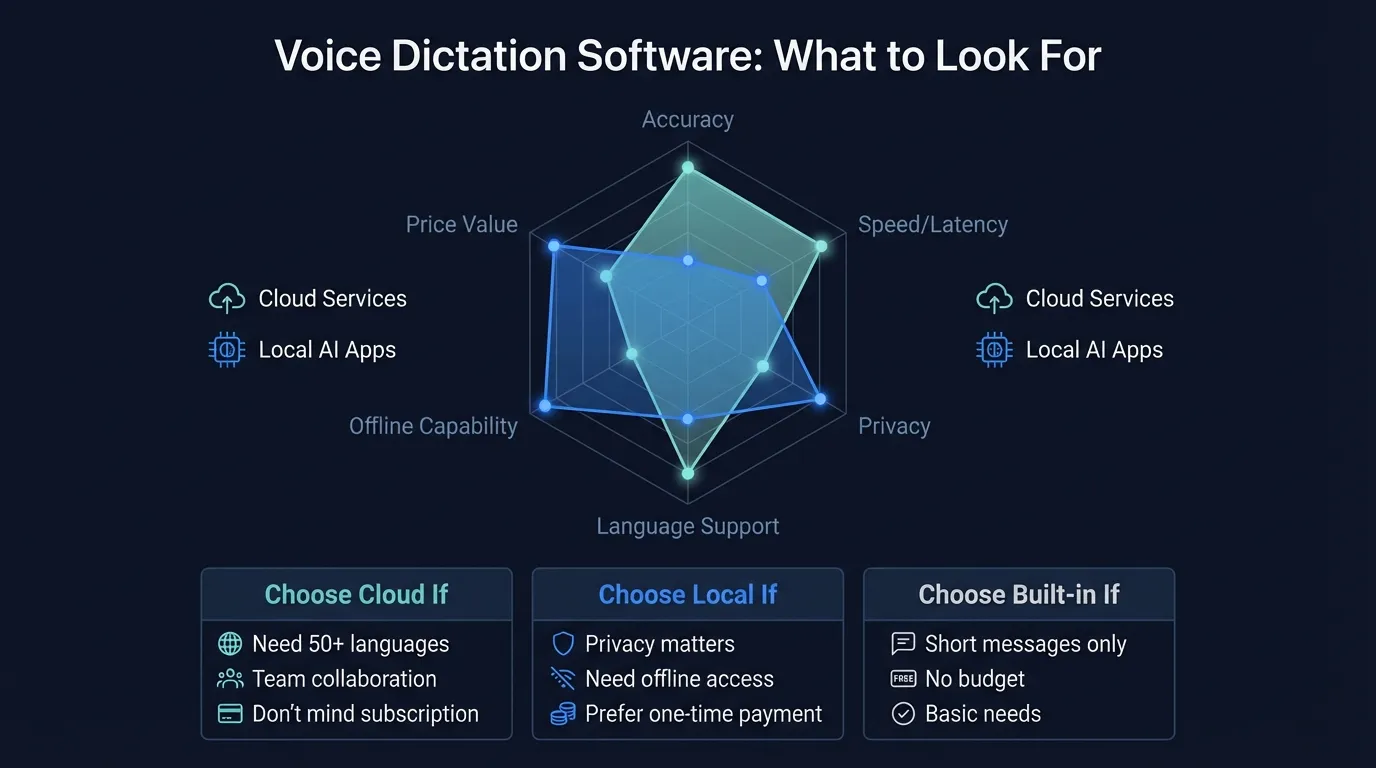
At a glance: how the major apps compare#
| App | Engine | Local or cloud | Offline | AI cleanup | System-wide | Price model |
|---|---|---|---|---|---|---|
| Hearsy | Parakeet + Whisper | Local | Yes | Yes (local or API) | Yes | One-time |
| SuperWhisper | Whisper | Local | Yes | Limited | Yes | Subscription |
| VoiceInk | Whisper | Local | Yes | No | Yes | One-time |
| Wispr Flow | Cloud (OpenAI) | Cloud | No | Yes | Yes | Subscription |
| macOS Built-in | Apple ASR | Local (M1+) | Yes | No | Yes | Free |
| Otter.ai | Cloud | Cloud | No | Yes | No (meetings only) | Subscription |
| MacWhisper | Whisper | Local | Yes | No | No (file-based) | One-time |
The rest of this guide unpacks each column.
1. Accuracy#
Accuracy in dictation software is measured by word error rate (WER) — the percentage of words transcribed incorrectly. A 5% WER means roughly one error every two sentences.
What the benchmarks show:
Whisper Large V3 achieved 4.2% WER on the LibriSpeech clean test set, according to OpenAI's 2023 paper. That's the standard reference point for on-device accuracy on English. Real-world performance is lower: clean, quiet audio is not the same as dictating during a noisy commute or with a strong regional accent.
Parakeet TDT — the model Hearsy uses as its default engine — is optimized specifically for English and produces competitive accuracy on standard speech while processing significantly faster than Whisper. The speed-accuracy tradeoff is real: Parakeet wins on speed; Whisper Large wins on difficult audio conditions, technical vocabulary, and non-English speech.
Where the differences actually show:
For everyday dictation of emails, documents, and Slack messages in standard English, Whisper-based apps and Parakeet-based apps produce comparable output. The gaps appear at the edges:
- Technical vocabulary (programming terms, medical jargon, brand names)
- Strong accents or non-native English speakers
- Background noise — coffee shops, open-plan offices, coworking spaces
- Domain-specific terminology outside the training data
Cloud services like Wispr Flow use OpenAI's speech API and achieve accuracy broadly similar to running Whisper locally. The difference isn't accuracy — it's where the audio goes.
2. Latency#
Latency is the delay between when you stop speaking and when text appears. This is the criterion most people underestimate until they've used a fast app and switched back to a slow one.
Two fundamentally different modes:
Streaming transcription outputs text word by word as you speak. Latency is near-zero mid-utterance and a few hundred milliseconds at the end of a phrase. Hearsy's Parakeet engine runs in streaming mode, which means on an M1 or later Mac, text appears within roughly 50ms of each word.
Chunk-based transcription collects a phrase or sentence, then processes it as a unit. This is how most Whisper-based apps work by default. Processing time ranges from around 300ms for small models to 1-2 seconds for Whisper Large V3, depending on hardware.
For writing prose, 1-2 seconds per phrase is workable. For anything where you need to see text appear while you're still speaking — real-time conversation notes, live captioning, keeping up with a fast-moving thought — streaming mode is noticeably better.
Cloud apps add network round-trip time on top of processing time. On a fast connection, latency can be under a second. On a slow connection or when the API is under load, you wait longer with no predictable floor.
3. Privacy#
This is where dictation apps diverge most clearly.
Local processing: Hearsy, VoiceInk, SuperWhisper, and MacWhisper run speech recognition entirely on your Mac. Audio is captured, processed, and discarded locally. Nothing is transmitted. The model runs on your CPU or GPU, and your words never reach a server.
Cloud processing: Wispr Flow and Otter.ai send audio to external servers for transcription. The audio is transmitted, processed, and — depending on the service's data retention policy — potentially stored. Wispr Flow's privacy policy states that voice data may be retained to improve their models. Otter retains audio and transcripts in their cloud by default.
For personal dictation — emails, notes, documents with no sensitive content — cloud processing may not concern you. For anything confidential — patient notes, legal briefs, business strategy, financial discussions, privileged communications — audio leaving your device is a real risk with real-world consequences.
A practical test: Run Little Snitch or another network monitor while dictating. Any app that makes outbound connections during transcription is sending your audio somewhere.
macOS built-in dictation is a partial case. On Apple Silicon Macs (M1 and later), it runs on-device. On Intel Macs, audio goes to Apple's servers.
The Dictation App Built for Mac
No subscriptions. No cloud. Just fast, accurate voice dictation that works in every app.
4. Offline support#
Local dictation apps work without an internet connection by definition — the model runs on your Mac, so there's nothing to connect to. Hearsy, SuperWhisper, VoiceInk, and MacWhisper all function offline after initial model download.
Cloud apps don't. Wispr Flow requires internet access for every transcription. Otter requires a connection for both transcription and sync. Without connectivity, they stop working.
If you dictate on planes, trains, in rural areas, or in locations with unreliable connectivity, offline support is a hard requirement. It's one of those things you don't think about until the moment you actually need it.
5. Language coverage#
Whisper Large V3: 99 languages, as documented in OpenAI's technical report. Coverage includes major European, Asian, Middle Eastern, and many lower-resource languages. Accuracy varies significantly by language — English, Spanish, French, German, and Japanese perform well; accuracy on lower-resource languages is lower, sometimes substantially.
Parakeet: English only. This is a real limitation if you dictate in other languages. The tradeoff is speed: Parakeet is meaningfully faster than Whisper, and the faster processing comes from optimizing for one language rather than 99.
macOS built-in dictation: Supports approximately 60 languages, with quality varying by language.
Cloud services: Typically match or exceed Whisper Large's language coverage, as most use OpenAI's speech API or Google's ASR infrastructure. Wispr Flow supports many languages through OpenAI.
If you dictate in any language other than English, Whisper Large is the practical choice. Hearsy lets you switch between Parakeet (fast English) and Whisper (multilingual) in settings. VoiceInk and SuperWhisper are Whisper-based by default.
6. AI post-processing#
Basic speech recognition transcribes what you said, including every "um," "uh," false start, and run-on sentence. AI post-processing takes the raw transcript and converts it to clean prose.
This is a meaningful difference in practice.
Unprocessed dictation:
So I wanted to uh talk about the Q4 report and um basically what happened was revenue was up but margins were kind of you know squeezed
After AI cleanup:
I wanted to discuss the Q4 report. Revenue was up, but margins were squeezed.
Not all dictation apps include this step.
MacWhisper outputs raw transcripts — that's what it's designed for. VoiceInk has basic cleanup. Hearsy's AI enhancement runs locally using Qwen 2.5 via MLX (no API key required) or through Claude or OpenAI APIs if you want a higher-quality cleanup model. Wispr Flow processes cleanup server-side through OpenAI's API.
Auto-punctuation is not the same as AI cleanup. Most Whisper-based apps insert periods and commas automatically using a post-processing step built into the Whisper model. This is different from rewriting filler words, correcting grammar, or reformatting output as a professional email or bullet list.
If clean output matters to you, check whether the app does real rewriting or just punctuation.
7. System scope#
There are three distinct categories of dictation scope, and confusing them leads to buying the wrong tool.
System-wide: Works in any app with a text field. Press a hotkey, speak, text appears wherever your cursor is — in Mail, Slack, Notion, VS Code, anywhere on your Mac. This is the mode that makes dictation a real workflow tool. Hearsy, SuperWhisper, VoiceInk, Wispr Flow, and macOS built-in all operate this way.
App-specific: Only works inside one application. Otter.ai transcribes within Otter's own interface, not into other apps. Google Docs voice typing only works inside Google Docs in Chrome. These tools serve their specific purpose well — meeting transcription, Docs-based writing — but they can't replace system-wide dictation.
File-based: You feed the app an audio file and get a transcript back. MacWhisper works this way. It's excellent for meeting recordings, podcasts, and audio archives. It's the wrong tool if you want to type by voice in real time.
If you're buying a dictation app specifically to type by voice across your Mac, confirm it operates system-wide before paying.
8. Price#
| App | Price model |
|---|---|
| macOS Built-in | Free |
| MacWhisper | One-time purchase |
| VoiceInk | One-time purchase |
| Hearsy | One-time purchase |
| SuperWhisper | Subscription |
| Wispr Flow | Subscription |
| Otter.ai | Subscription |
One-time pricing means you pay once and own the software. You get updates, but not necessarily perpetual access to new major features or continuously updated AI models. Subscription pricing means ongoing monthly or annual payments; in return, you typically get automatic model upgrades, cloud processing, and ongoing feature development.
The subscription math compounds. Whether that's a good deal depends on how much you use the app and whether you need the features that require server infrastructure (cloud-based transcription, cross-device sync, continuously updated AI).
For most individual users, a one-time purchase app covers the same functional ground — local models have reached cloud-level accuracy, and the underlying Whisper and Parakeet models don't require a subscription to run.
Which criterion matters most for your workflow#
You dictate anything confidential: Prioritize local processing. Rule out any app that shows network activity during dictation.
You need the fastest text output: Prioritize streaming transcription with Parakeet. For turn-based workflows, any modern Whisper implementation on Apple Silicon is fast enough.
You dictate in languages other than English: Prioritize Whisper Large V3. Parakeet is English-only; Whisper Large handles 99 languages.
You want clean output without editing: Prioritize apps with real AI post-processing — not just auto-punctuation. Check specifically whether filler word removal and rewriting are included.
You move between many apps throughout the day: Confirm system-wide scope. App-specific and file-based tools are the wrong category for this use case.
You want to avoid ongoing subscription costs: One-time purchase apps (Hearsy, VoiceInk, MacWhisper) cover the core use case. Subscriptions make sense if you specifically want cloud processing or automatic model upgrades.
Putting it together#
Most Mac dictation apps in 2026 run on Whisper or Parakeet. The underlying model quality is similar across the field — what separates apps is where audio goes, how fast text appears, what happens after transcription, and how much they cost.
The local-vs-cloud split is the biggest decision. Local apps (Hearsy, SuperWhisper, VoiceInk) give you privacy, offline access, and no recurring cost. Cloud apps (Wispr Flow, Otter) give you easier setup and continuous model updates, but your audio leaves your device and there's a monthly cost. Neither set of trade-offs is wrong — the right choice depends on what you're dictating.
For a full ranked comparison of dictation apps including free options, see the best free dictation software for Mac guide. For the best dictation software for Mac overview covering all paid options, see the pillar guide. For initial setup, the voice recognition setup guide covers the full installation and permissions process.
Frequently asked questions#
What is voice dictation software?#
Voice dictation software converts spoken words to text in real time. It captures audio from your microphone, runs it through a speech recognition model, and types the result into whatever app you're using — email, documents, messaging apps, code editors, notes. The key distinction from meeting transcription tools: it works system-wide, not just in one application.
What should I look for in dictation software?#
Five criteria cover most use cases: accuracy (word error rate in real-world conditions), latency (streaming vs. chunk-based transcription), privacy (local vs. cloud audio processing), offline support (works without internet), and price model (one-time vs. subscription). AI post-processing and system-wide scope are secondary differentiators that matter for specific workflows.
Is local or cloud dictation software more accurate?#
They're comparable now. Whisper Large V3 achieves 4.2% WER on clean audio according to OpenAI's 2023 paper, which matches cloud service performance on the same audio. The accuracy gap that existed in 2021-2022 has closed. The practical differences between local and cloud apps today are privacy, latency consistency, and price — not accuracy on standard English.
What's the best dictation software for privacy?#
Apps that run entirely on-device — Hearsy, SuperWhisper, VoiceInk, and MacWhisper — keep audio on your Mac and don't transmit it anywhere. To verify: run a network monitor like Little Snitch during active dictation. Any app making outbound connections while you speak is sending your audio externally.
Do I need a subscription for dictation software?#
No. Hearsy, VoiceInk, and MacWhisper use one-time pricing and run locally without any cloud dependency. macOS built-in dictation is free. Subscriptions apply to apps that require ongoing server infrastructure — cloud transcription, model updates, cross-device sync. For local dictation on a single Mac, a one-time purchase covers everything a subscription app provides at the core functionality level.
Ready to Try Voice Dictation?
Hearsy is free to download. No signup, no credit card. Just install and start dictating.
Download Hearsy for MacmacOS 14+ · Apple Silicon · Free tier available
Related Articles
Best Dictation Software for Mac in 2026: Honest Comparison
19 min read
Voice Recognition Software in 2026: From Dragon to AI-Native Apps
11 min read
Talk to Type Software: The Best Apps for Voice Typing in 2026
9 min read
Medical Dictation Software for Mac: Dragon Alternatives for Doctors in 2026
14 min read
Best Legal Dictation Software in 2026: Honest Comparison
16 min read