
Otter AI Alternative: 5 Better Options for 2026
Looking for an Otter AI alternative? These 5 tools offer local processing, no subscription, and better privacy — whether you need meeting transcription or daily Mac dictation.
Otter.ai became the standard for meeting transcription — invite a bot to your call, get a searchable transcript afterward, share it with your team. For that specific workflow, it works. But three things keep people looking for alternatives: the subscription costs over $100 per year, all audio goes to Otter's cloud, and if you need to type by voice anywhere other than a meeting, Otter isn't the right tool.
This guide covers five alternatives, organized by what you're actually trying to accomplish.
One disclosure upfront: Hearsy is our product. We've tried to write this comparison honestly — including cases where a different tool is the better fit.
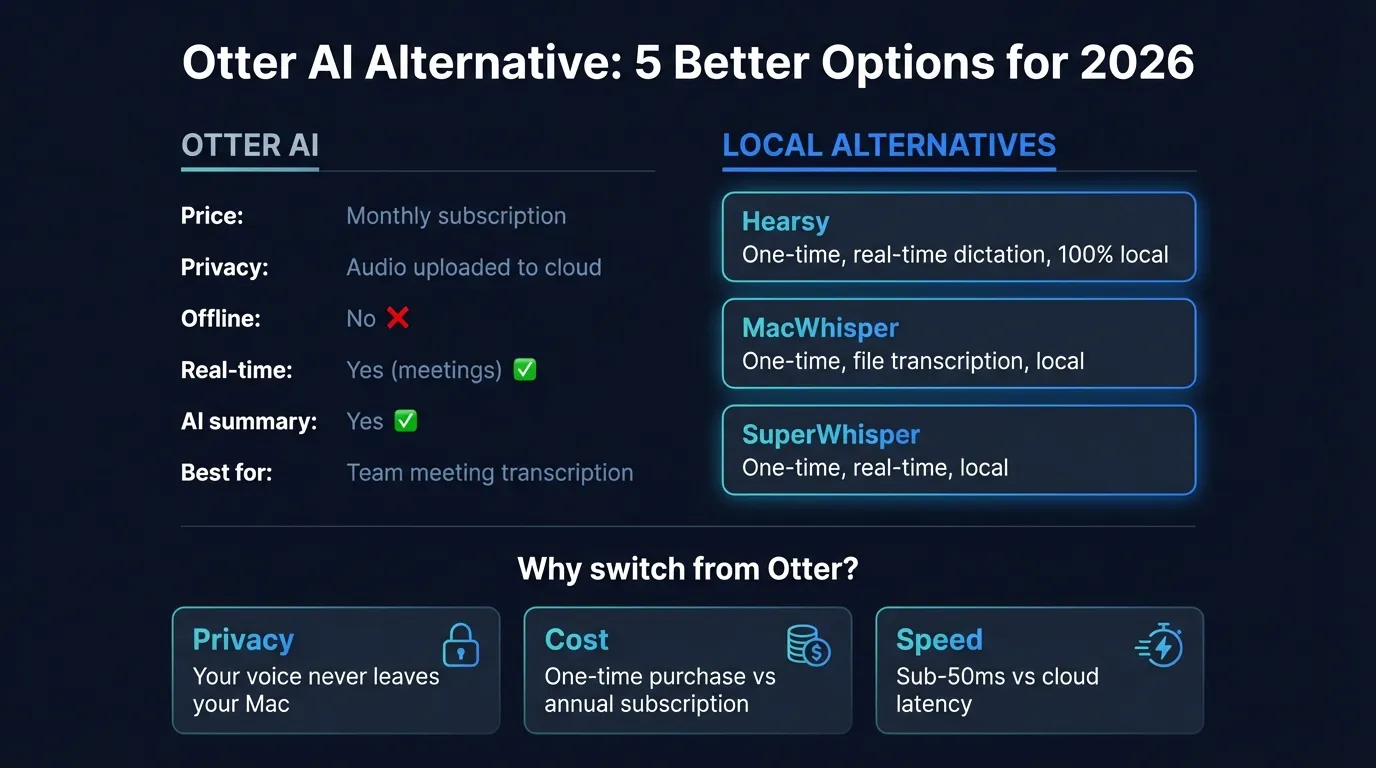
Here's how the top Otter AI alternatives compare at a glance:
What Otter AI does (and where it falls short)#
Otter.ai is a cloud-based meeting transcription service. You invite an Otter bot to your Zoom, Google Meet, or Microsoft Teams call. It transcribes the conversation in real time, tags speakers, and generates summaries and action items. Transcripts sync to Otter's web interface and can be shared with your team.
That's its core value: automated meeting notes, no manual work.
It's cloud-only. Every second of audio from every meeting you record goes to Otter's servers for processing and storage. If you're discussing anything sensitive — a job search, business strategy, medical consultations, legal matters — that audio lives on Otter's infrastructure, subject to their data policies.
It has hard usage limits. The free plan caps you at 300 transcription minutes per month and 30 minutes per conversation. Miss a 45-minute meeting and you'll hit the limit. The Pro plan ($8.33/month billed annually, $16.99/month billed monthly) extends that to 1,200 minutes per month, with only 10 audio file imports.
It's not real-time system-wide dictation. Otter records meetings. It does not let you press a hotkey and type by voice into Gmail, Slack, VS Code, or any other Mac app. If that's what you're after — reducing keyboard use, writing faster by voice, or voice-first workflows — Otter is the wrong category of tool.
The 5 best Otter AI alternatives for 2026#
1. Hearsy — Best for local real-time dictation on Mac#
Best for: Mac users who want to type by voice anywhere, with local processing and one-time pricing.
If you've been using Otter for dictation-style use — narrating notes, composing messages by voice — Hearsy is built specifically for that. Press a global hotkey from any app on your Mac, speak, and text appears at your cursor. Works in Gmail, Slack, VS Code, Apple Notes, Terminal — anywhere you can type.
The key difference from Otter: everything runs on your Mac. Hearsy uses two AI engines — NVIDIA Parakeet TDT for English (under 50ms latency on Apple Silicon) and OpenAI Whisper Large V3 for 99 languages. Neither sends audio anywhere. You can verify this with a network monitor like Little Snitch: during transcription, Hearsy makes no outbound connections.
AI cleanup: Hearsy includes post-processing templates — Clean & Format, Email, Code Comment, Summary — powered by a local language model (Qwen 2.5 via MLX). Raw dictation gets cleaned up without touching a cloud server.
Pricing: One-time purchase. No subscription.
What it doesn't replace: Otter's OtterPilot, which automatically joins and transcribes calls you're not present in. Hearsy doesn't have a meeting bot. If automated meeting bot transcription is what you need, see options 4 and 5 below.
2. MacWhisper — Best for transcribing recordings locally#
Best for: Transcribing recorded meetings, interviews, and podcasts without sending audio to the cloud.
MacWhisper is a local file transcription app built on whisper.cpp (the optimized C++ port of Whisper). Drop in an audio or video file — a Zoom recording you downloaded, a voice memo, a podcast episode — and MacWhisper transcribes it entirely on your Mac.
This addresses one of Otter's specific use cases: transcribing existing recordings. The difference is privacy and cost. With MacWhisper, recordings never leave your device. Otter's free plan allows importing only 3 audio files per user lifetime; Pro allows 10 file imports per month.
MacWhisper supports 50+ export formats (SRT, VTT, CSV, JSON, plain text) and uses Metal GPU acceleration on Apple Silicon. On M2 hardware, transcribing a 60-minute recording takes roughly 30–60 seconds.
Pricing: Free tier with smaller models; Pro approximately $30/year or ~$80 lifetime. Verify current pricing at point of purchase.
What it doesn't do: MacWhisper is file-in, text-out. There's no bot that joins live calls automatically, and it's not optimized for real-time typing. For live dictation, see Hearsy or SuperWhisper.
3. SuperWhisper — Best local Whisper dictation for power users#
Best for: Users who want a polished, Whisper-based dictation experience with a free tier to start.
SuperWhisper is a well-established Mac dictation app with a strong developer and content-creator following. It runs Whisper locally (up to Large V3), supports 100+ languages, and processes audio entirely on-device.
Its free tier includes unlimited use of smaller Whisper models — genuinely useful for low-volume dictation without spending anything. For users who need Large V3 accuracy on technical vocabulary or non-English content, Pro is $8.49/month or $84.99/year.
Compared to Otter: SuperWhisper is system-wide Mac dictation, not meeting transcription. These tools serve different purposes. SuperWhisper lets you type by voice in any app. It doesn't join your calls.
Compared to Hearsy: SuperWhisper uses Whisper only — there's no Parakeet engine, so you don't get the sub-50ms English dictation speed Parakeet delivers. The lifetime pricing ($249.99) is substantially higher than Hearsy or VoiceInk for equivalent local functionality.
4. VoiceInk — Best budget local dictation#
Best for: Users who want the simplest path to private, offline dictation at the lowest possible cost.
VoiceInk is a $25 one-time purchase built on Whisper, open-source on GitHub, and processed entirely on-device. It works system-wide in any Mac text field — push-to-talk and always-on modes, custom word replacements, and context-aware transcription (Power Mode) that reads surrounding text to improve accuracy on technical content.
At $25 one-time versus $100+/year for Otter Pro, VoiceInk is the most cost-efficient option on this list if your goal is reducing dictation spend and moving to local processing.
What it doesn't do: No meeting bot. The AI cleanup is basic compared to Hearsy's local LLM integration — there are no templates or multi-mode post-processing. For straightforward dictation without post-processing, VoiceInk delivers at minimal cost.
Trial: 7-day free trial, 14-day money-back guarantee. Requires macOS 14.0 or later.
5. tl;dv — Best free cloud meeting transcription alternative#
Best for: Users who need Otter's meeting bot functionality but want a free starting point or better integrations.
If Otter's meeting bot is what you actually need — automatic transcription of Zoom, Google Meet, and Teams calls with AI summaries — tl;dv is the most accessible alternative. It has a usable free tier, supports 30+ languages, and integrates with Slack, Notion, HubSpot, and other tools.
The free tier is substantive, not a stripped trial. Paid plans are available for teams that need more volume, CRM integrations, or advanced analytics.
Trade-off: Like Otter, tl;dv is cloud-based. Audio from your meetings goes to tl;dv's servers. If the reason you're leaving Otter is privacy — you want audio to stay off external servers — tl;dv doesn't solve that. In that case, the local stack is MacWhisper (for transcribing recordings) plus Hearsy or SuperWhisper (for live dictation).
The Privacy-First Alternative
100% local processing. No subscription. One-time purchase. Works in every app on your Mac.
At a glance#
| App | Primary use | Processing | Offline | Meeting bot | Price |
|---|---|---|---|---|---|
| Otter.ai | Meeting transcription | Cloud | No | Yes | $8.33–$16.99/mo |
| Hearsy | Real-time dictation | Local | Yes | No | One-time |
| MacWhisper | File transcription | Local | Yes | No | ~$30/yr |
| SuperWhisper | Real-time dictation | Local | Yes | No | Free tier; $8.49/mo Pro |
| VoiceInk | Real-time dictation | Local | Yes | No | $25 one-time |
| tl;dv | Meeting transcription | Cloud | No | Yes | Free tier; paid plans available |
The privacy difference#
Otter.ai is cloud-only by design. Every meeting you record is transmitted to Otter's servers for transcription. That audio exists on third-party infrastructure, subject to their retention and use policies.
The local alternatives handle this structurally differently. Hearsy, MacWhisper, SuperWhisper, and VoiceInk run speech recognition models on your Mac. Audio is processed in local RAM and never exists on any external server. You can verify this behavior with a network monitor — these apps make no outbound connections during transcription.
For most personal use cases, cloud processing is probably fine. If you're dictating anything sensitive — medical consultations, legal discussions, business strategy, personal notes — local processing changes the equation. Audio that stays on your device doesn't appear on someone else's infrastructure, regardless of their privacy policy.
Cost over time#
Otter.ai Pro billed monthly is $16.99/user/month ($203.88/year). Billed annually it's $8.33/month ($99.96/year). Business plans start at $20/user/month billed annually.
Over two years at annual billing:
| App | 2-year cost |
|---|---|
| Otter Pro (annual) | ~$200 |
| Hearsy | One-time |
| VoiceInk | $25 |
| MacWhisper | ~$60 |
| SuperWhisper | ~$170 |
| tl;dv | Free tier available |
The subscription cost is justified if you need Otter's meeting bot — automatic call joining, speaker identification, and team-shared transcripts are features local apps don't provide. For daily voice typing into your Mac, paying $100+/year for a cloud meeting tool is the wrong category.
Which to choose#
You need automatic meeting transcription with a bot that joins calls: tl;dv (start free) or stay on Otter if their specific integrations matter.
You want to type by voice in any Mac app — emails, Slack, documents, code: Hearsy. Local processing, one-time price, AI cleanup templates, Parakeet engine for English speed.
You need to transcribe existing recordings privately: MacWhisper. Drag audio files in, get transcripts out, nothing leaves your device.
You want a polished Whisper dictation experience at no cost: SuperWhisper's free tier with smaller models is genuine and unlimited.
You want the cheapest paid entry into local dictation: VoiceInk at $25 one-time.
For more on local Mac dictation options, see the best dictation software for Mac guide. For privacy implications of cloud voice services, see the voice data privacy guide.
Frequently asked questions#
What is the best free alternative to Otter AI?#
For meeting transcription: tl;dv offers a usable free tier for recording and transcribing Zoom, Google Meet, and Teams calls. For real-time dictation on Mac: SuperWhisper's free tier runs Whisper locally with no cost. For basic occasional dictation without installing anything: macOS built-in dictation is free but limited to 30-60 seconds per session.
Is there a private alternative to Otter AI?#
Yes. Hearsy, SuperWhisper, VoiceInk, and MacWhisper all process audio entirely on your Mac — nothing is sent to any server. Unlike Otter, which requires cloud processing for every transcription, these apps run AI models on-device using Apple Silicon's Neural Engine and GPU. You can verify local behavior with a network monitor: no outbound connections occur during transcription.
Does Otter AI work on Mac without internet?#
No. Otter.ai requires an internet connection for all transcription — it's entirely cloud-based. For offline voice dictation on Mac, local apps like Hearsy, SuperWhisper, and VoiceInk work on planes, in buildings without Wi-Fi, or anywhere internet is unavailable.
Can I use Otter AI for real-time system-wide dictation on Mac?#
Otter.ai is designed for meeting transcription. Its main feature is a bot that joins calls and records them automatically. It's not a system-wide dictation tool that lets you press a hotkey and type by voice into any Mac application. For that use case, Hearsy, SuperWhisper, and VoiceInk are purpose-built.
What replaced Otter AI for daily dictation in 2026?#
The market has split clearly. For cloud-based meeting transcription: tl;dv, Fireflies.ai, and Notion AI Meeting Notes serve the same use case at competitive prices. For users who want audio to stay off cloud servers: local Mac apps cover both real-time dictation (Hearsy, SuperWhisper) and file transcription (MacWhisper) without any server involvement.
Ready to Try Voice Dictation?
Hearsy is free to download. No signup, no credit card. Just install and start dictating.
Download Hearsy for MacmacOS 14+ · Apple Silicon · Free tier available
Related Articles
Wispr Flow vs SuperWhisper vs Hearsy: 3-Way Mac Dictation Comparison
14 min read
Wispr Flow vs Hearsy: Privacy, Speed & Features Compared
8 min read
Willow Voice vs Hearsy: Cloud Subscription vs Local One-Time
8 min read
VoiceInk vs Hearsy: Mac Dictation Apps Compared
6 min read
Talon Voice vs Hearsy: Full Voice Control vs Fast Dictation
7 min read