
VoiceInk vs Hearsy: Mac Dictation Apps Compared
Both VoiceInk and Hearsy run Whisper and Parakeet locally on your Mac. Here's where they differ: open source, AI cleanup, Power Mode, and pricing.
VoiceInk and Hearsy are both local Mac dictation apps running Whisper and Parakeet on-device. Neither sends audio to a cloud server. Both cost a one-time fee. If those are your only criteria, you'll need to dig into the details to find the real differences.
One disclosure upfront: Hearsy is my product. I've tried to write this honestly — including areas where VoiceInk is the better fit.
Here's how VoiceInk and Hearsy compare across the features that matter most:
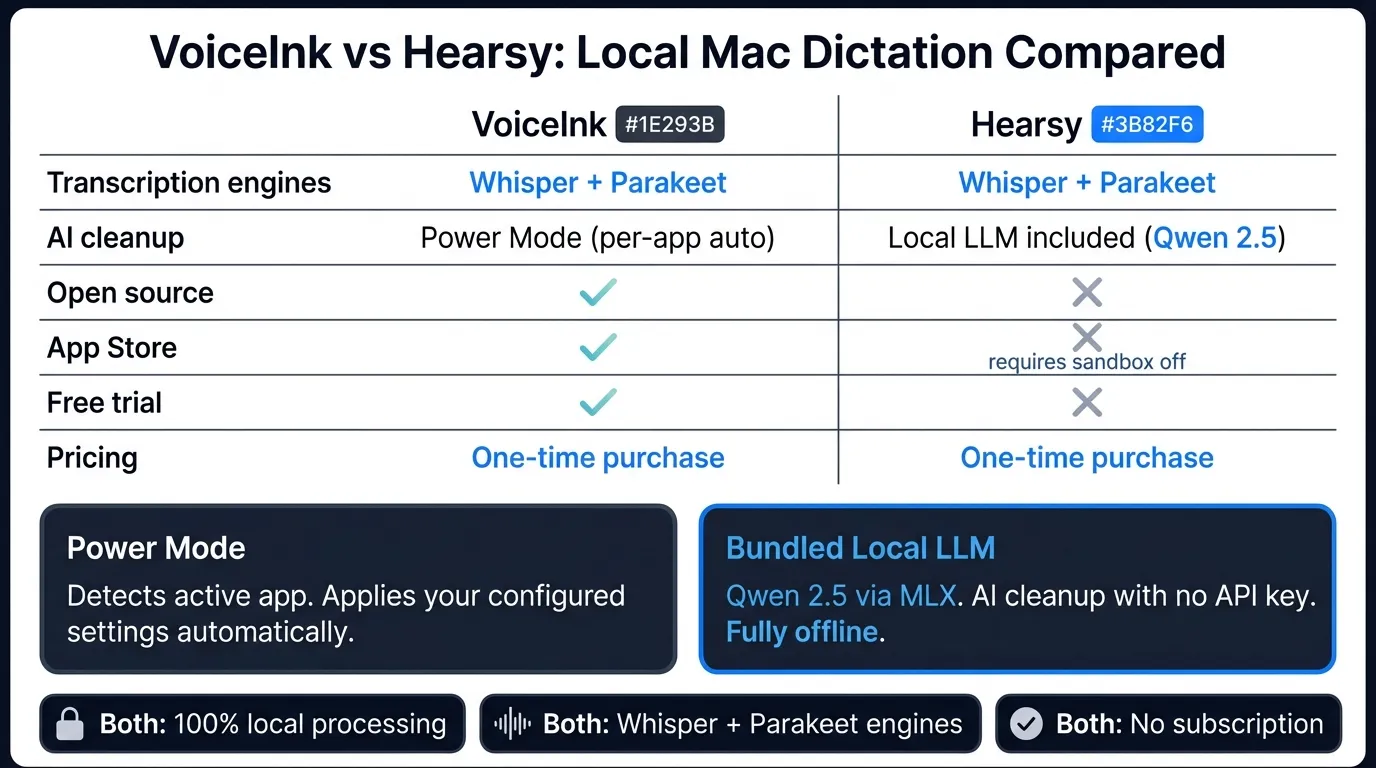
Quick comparison: For a side-by-side feature table, pricing breakdown, and FAQ, see our VoiceInk vs Hearsy comparison page.
What VoiceInk is#
VoiceInk is a local dictation app for macOS, open-sourced on GitHub. Press a hotkey, speak, and text appears system-wide in any app. Transcription runs entirely on your Mac via two AI engines: Whisper (using whisper.cpp) and Parakeet (via FluidAudio integration).
VoiceInk's signature feature is Power Mode: it detects which app is in focus and applies pre-configured settings automatically. Switch from Notion to Gmail to your code editor, and your settings for each context load without touching anything.
Available on the Mac App Store and as a direct download. Free trial before purchase.
What VoiceInk is: A local Mac dictation app with Whisper + Parakeet, automatic per-app configuration via Power Mode, and a codebase anyone can inspect or self-compile for free.
What Hearsy is#
Hearsy is a menu-bar dictation app for macOS running the same two engines: Parakeet TDT and Whisper Large V3. Press a global hotkey, speak, and text is pasted at your cursor — entirely local, no network call.
The main differentiator is AI post-processing. Hearsy ships with a bundled local LLM — Qwen 2.5 via MLX — that handles AI cleanup templates without requiring an API key or internet connection. Clean & Format, Email, Code Comment, Summary: pick one before dictating, and cleanup runs entirely on-device.
What Hearsy is: A local Mac dictation app with two transcription engines and a bundled local LLM for zero-configuration AI cleanup. One-time purchase.
Engines: both run Whisper and Parakeet#
This is usually where a comparison post declares a winner. Here, there isn't one — both apps run the same two transcription engines.
Parakeet TDT (via FluidAudio) handles English dictation in under 50ms on Apple Silicon. Text appears essentially immediately after you stop speaking. Both VoiceInk and Hearsy have integrated this engine.
Whisper Large V3 (via whisper.cpp) covers 99+ languages with a 4.2% word error rate on the LibriSpeech clean test set, per OpenAI's 2023 paper. Processing takes roughly 1–2 seconds for a typical sentence on M-series hardware. Both apps use this.
The practical implication: if you're choosing between these two specifically for engine performance or language support, you won't find a meaningful difference. They're running the same code under the hood. The real differences are in everything built around the engines.
The Privacy-First Alternative
100% local processing. No subscription. One-time purchase. Works in every app on your Mac.
Open source vs closed source#
VoiceInk is fully open source on GitHub under the MIT license. You can read every line, verify what happens to your audio, and compile it yourself at no cost. For users who consider open-source transparency a hard requirement — researchers, security-conscious professionals, anyone who wants to audit rather than just trust — VoiceInk wins this comparison outright.
Privacy claims are easy to make. An open codebase is independently auditable.
Hearsy is not open source. You can verify network behavior with a tool like Little Snitch during a session, and you'll see no outbound connections during transcription. But you're trusting that claim rather than reading code to confirm it.
If you need to know exactly what software does with your audio at the implementation level, VoiceInk has the more defensible position.
Power Mode vs AI templates#
This is the most meaningful workflow difference between the two apps.
VoiceInk's Power Mode is automatic. The app detects which application is in the foreground and applies your pre-configured settings for that context. If you've defined specific formatting preferences for Gmail, a different Whisper model for a code editor, and a custom personal dictionary for a writing environment, those settings load on their own as you switch apps. There's no manual selection step.
Hearsy's approach is explicit. Before dictating, you pick a template: Clean & Format, Email, Code Comment, or Summary. Cleanup runs locally via the bundled Qwen 2.5 model — no API key needed, no internet connection. The templates handle the most common cases without any prompt configuration. If you need something different, you switch manually before the next dictation.
Neither approach is strictly better. Power Mode suits users who move between many contexts throughout the day and find manual template switching disruptive. Hearsy's explicit templates suit users who want to know exactly which processing will run — and who prefer AI cleanup that works out of the box rather than requiring per-app setup.
One practical note: Hearsy's Qwen 2.5 LLM runs entirely in local RAM. VoiceInk includes AI-enhanced features (Context Awareness, AI Assistant), but implementation details vary — check VoiceInk's current documentation for which features run fully on-device versus which may use a network connection.
App Store vs direct download#
VoiceInk is on the Mac App Store. Standard installation, automatic OS-level updates, App Store sandboxing.
Hearsy is not on the App Store and can't be. The app pastes text by simulating Cmd+V via CGEvent at the system level, which requires Accessibility permission and a non-sandboxed build. App Store apps are sandboxed, which prevents posting synthetic keyboard events to other apps.
In practice: if App Store distribution is a requirement — for MDM management, IT policy, or personal preference — VoiceInk is the option. Both apps are available as direct downloads from their respective developer sites.
For a comparison with cloud-based options, see Wispr Flow vs Hearsy. For how Parakeet compares to Whisper as transcription engines, see Whisper vs Parakeet. For the full Mac dictation landscape, see best dictation software for Mac. For context on why local processing differs from cloud, see AI transcription: local vs cloud.
Ready to Try Voice Dictation?
Hearsy is free to download. No signup, no credit card. Just install and start dictating.
Download Hearsy for MacmacOS 14+ · Apple Silicon · Free tier available
Related Articles
Otter AI Alternative: 5 Better Options for 2026
11 min read
Wispr Flow vs SuperWhisper vs Hearsy: 3-Way Mac Dictation Comparison
14 min read
Wispr Flow vs Hearsy: Privacy, Speed & Features Compared
8 min read
Willow Voice vs Hearsy: Cloud Subscription vs Local One-Time
8 min read
Talon Voice vs Hearsy: Full Voice Control vs Fast Dictation
7 min read