
MacWhisper vs Hearsy: File Transcription vs Real-Time Dictation
MacWhisper transcribes audio files. Hearsy dictates in real time. Both run Whisper locally. Here's when to use each and when you might want both.
MacWhisper gets around 5,400 brand searches per month. Most of those people are looking to transcribe a recording — a podcast, interview, or meeting. Some want live dictation. The apps built for each workflow are different, and so is the right choice.
One disclosure: Hearsy is my product. I've written this honestly, including where MacWhisper is the better fit.
Here's how MacWhisper and Hearsy differ across the key dimensions:
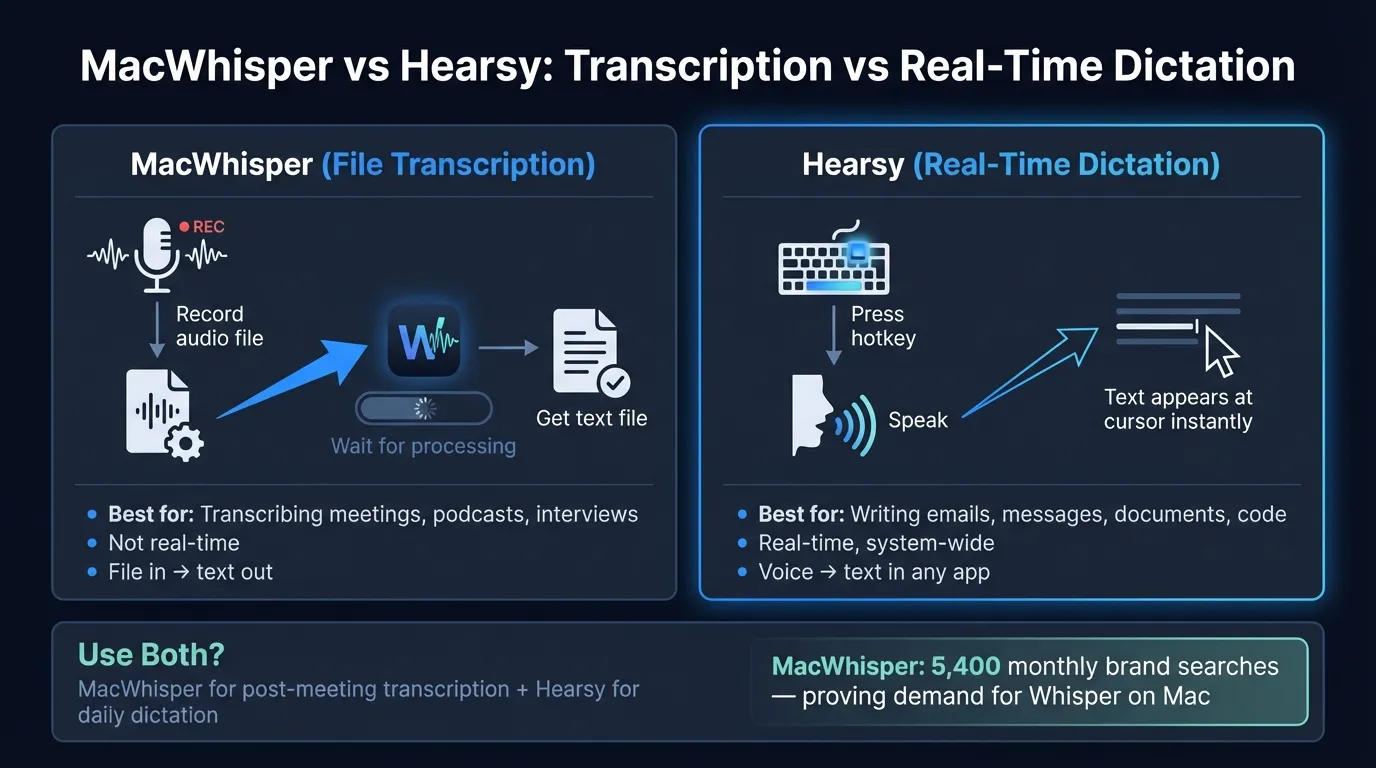
Quick comparison: For a side-by-side feature table, pricing breakdown, and FAQ, see our MacWhisper vs Hearsy comparison page.
What MacWhisper is#
MacWhisper, by developer Jordi Bruin, is primarily an audio file transcription app for Mac. The core workflow: drop in an audio file, get a timestamped transcript. It runs Whisper locally on your device — nothing leaves your machine.
Built around batch transcription, MacWhisper handles podcasts, interview recordings, meeting audio, and video files. Notable features include 50+ export formats, speaker diarization (labeling who said what in a multi-speaker recording), batch processing queues, watch folders that automatically transcribe any new audio dropped into a directory, and translation pipelines via Whisper or the DeepL API.
MacWhisper has a secondary dictation mode — a hotkey that lets you speak and paste text at your cursor system-wide. But dictation is an add-on. The core design is built around processing files.
The free tier uses smaller Whisper models (Tiny and Base). Pro adds Large V2 and V3 for better accuracy, batch processing, and speaker identification. Pro is a one-time purchase with no subscription.
What MacWhisper is: A local audio file transcription app. Drag in a recording, get a transcript. On-device, no cloud.
What Hearsy is#
Hearsy is a real-time dictation app. Press a global hotkey from any Mac app, speak, and text is pasted at your cursor when you release the key. The workflow is built around live voice input during writing — not processing recordings after the fact.
Two engines handle transcription:
- Parakeet TDT (English) — under 50ms latency on Apple Silicon, 1.2 GB RAM
- Whisper Large V3 (99 languages) — 4.2% word error rate on LibriSpeech benchmarks, ~3.1 GB RAM
Optional AI cleanup templates — Clean & Format, Email, Code Comment, Summary — run locally via Qwen 2.5 by default, with no API call required. If you want more capable formatting, Claude or OpenAI can handle the cleanup step, but transcription stays local either way.
Hearsy doesn't process audio files. There's no drag-and-drop transcription, no batch mode, no speaker identification for recordings.
What Hearsy is: A local Mac dictation app. Press a hotkey, speak, get text. One-time purchase, no subscription.
The Privacy-First Alternative
100% local processing. No subscription. One-time purchase. Works in every app on your Mac.
The core difference: two different jobs#
This comparison is unusual because MacWhisper and Hearsy mostly don't compete. They're built for different workflows.
MacWhisper's workflow: You have a recording. A podcast you want to publish with a transcript. An interview you want to quote from. A meeting you recorded and need action items from. You drop the file in, MacWhisper runs Whisper on it, and you get a timestamped transcript you can search, edit, and export. This can run in the background while you work on something else.
Hearsy's workflow: You're working in a text editor, email client, Notion, Slack, or any other Mac app. Instead of typing, you press a hotkey, say what you want, and the words appear at your cursor. The cycle is a few seconds: press, speak, release, write. You dictate content as you work, rather than transcribing something you've already recorded.
The workflows don't overlap much. You can't use Hearsy to process a podcast recording. You can use MacWhisper's dictation mode for live input, but it's a secondary feature added to a tool built for batch processing.
MacWhisper's dictation mode#
MacWhisper includes a dictation feature that works similarly to Hearsy: assign a hotkey, speak, get text at your cursor system-wide. It's only available in the direct download version of MacWhisper — not the Mac App Store version, due to Apple's restrictions on synthetic keyboard events.
If you're already using MacWhisper for file transcription and occasionally need to dictate, this mode is reasonable. You don't need a second app for light dictation use.
For high-volume dictation, two differences matter.
First, latency. MacWhisper's dictation mode runs Whisper, which takes about 1–2 seconds per burst on Apple Silicon. Hearsy's Parakeet engine processes English in under 50ms. For a few quick sentences that's negligible. For hours of daily dictation, a 1–2 second pause after every sentence accumulates noticeably into your writing rhythm.
Second, AI cleanup. After transcribing, Hearsy can run Qwen 2.5 locally to strip filler words, fix punctuation, or format text as an email or code comment — depending on which template you selected before speaking. MacWhisper's dictation mode returns raw transcription, no post-processing.
For occasional dictation, MacWhisper's built-in mode is fine. For daily high-volume dictation, the latency and cleanup gap is real.
Speed#
For file transcription:
MacWhisper with Whisper Large V3 processes audio well above real-time speed on Apple Silicon. According to MacWhisper's documentation, M4 chips achieve roughly a 1:12 transcription ratio — a one-hour recording finishes in about five minutes. For batch workflows, this speed is mostly invisible: drop files in, come back to finished transcripts.
For live dictation:
MacWhisper's dictation mode: ~1–2 seconds between releasing the hotkey and text appearing at your cursor.
Hearsy with Parakeet: under 50ms. Text appears essentially the moment you release the key.
Hearsy with Whisper Large V3: ~1–2 seconds, same as MacWhisper's dictation mode.
The 50ms response changes the feel of dictation. At 1–2 seconds, you speak, pause, check the screen, continue — a stutter rhythm. Under 50ms, text appears before the pause registers consciously. For users who dictate heavily, that difference shows up quickly.
For more on Whisper-based Mac apps, see the OpenAI Whisper guide. For how local and cloud transcription compare, see AI transcription: local vs cloud. For a comparison with other local dictation apps, see SuperWhisper vs Hearsy and best dictation software for Mac.
Ready to Try Voice Dictation?
Hearsy is free to download. No signup, no credit card. Just install and start dictating.
Download Hearsy for MacmacOS 14+ · Apple Silicon · Free tier available
Related Articles
Otter AI Alternative: 5 Better Options for 2026
11 min read
Wispr Flow vs SuperWhisper vs Hearsy: 3-Way Mac Dictation Comparison
14 min read
Wispr Flow vs Hearsy: Privacy, Speed & Features Compared
8 min read
Willow Voice vs Hearsy: Cloud Subscription vs Local One-Time
8 min read
VoiceInk vs Hearsy: Mac Dictation Apps Compared
6 min read